WORKFORCE INTELLIGENCE PLATFORM
Attendance & Productivity Tracking Software
Professional-grade, privacy-friendly attendance software with automated clock-in/out, idle detection, activity insights, and accurate reporting—built to scale with growing teams.
5 - Average Rating
- Free 30-day trial
- No credit card required
- Cancel anytime


Smart Attendance

Performance Insights

Intelligent Tracking

Workforce Control
Key Features – Office Punch
Auto Attendance
Screenshot
App & Website Tracking
Active vs Idle Analysis
Productivity
Screenshot Privacy Control
Manual Punch Options
Break & Status Management
Attendance History
Screenshot Logs
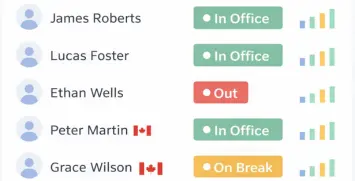

Real-Time Monitoring
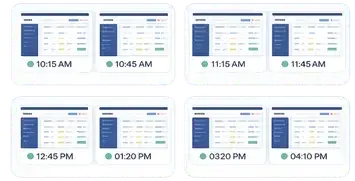

Smart Screenshots
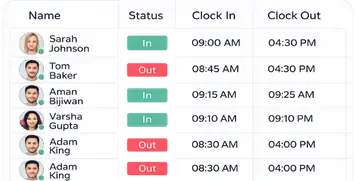

Attendance Insights
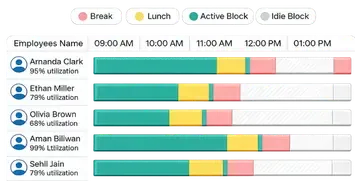

Productivity Insights
Audit Logs
Admin Dashboard
Team Management
Workforce Visibility
Productivity Insights
Role Permissions
Daily Activity Timeline
Reports & Analytics
Timezone Support
Security & Control
-
All Features
Simple & Transparent
Choose a plan that works best for your team — from small teams getting started to organizations managing distributed workforces.
Free Plan
NO COMMITMENT
For small teams who want to track attendance, monitor basic productivity, and explore Office Punch without any upfront cost.
Free Plan includes:
-
5 Users
-
Basic Time & Attendance
-
Auto Clock-In / Clock-Out
-
Idle Time Auto Clock-Out
-
Time History & Monthly Reports (last 30 days)
Premium Plan
MOST POPULAR
For growing teams that need advanced productivity monitoring, screenshots, and detailed performance insights.
Premium Plan includes:
-
Unlimited Users
-
Everything in Free Plan
-
Smart Screenshot Monitoring
-
App & Website Usage Tracking
-
Advanced Productivity Reports
-
Geo-Fencing Restriction
-
Shift Management
-
1 Year Data Retention
Custom Plan
ENTERPRISE SOLUTION
For large teams and organizations that require advanced security, integrations, and custom deployment options.
Custom Plan includes:
-
Everything in Premium Plan
-
Scalable Integrations
-
Priority Customer Support
Free Plan
NO COMMITMENT
For small teams who want to track attendance, monitor basic productivity, and explore Office Punch without any upfront cost.
Free Plan includes:
-
5 Users
-
Basic Time & Attendance
-
Auto Clock-In / Clock-Out
-
Idle Time Auto Clock-Out
-
Time History & Monthly Reports (last 30 days)
Premium Plan
MOST POPULAR
For growing teams that need advanced productivity monitoring, screenshots, and detailed performance insights.
Premium Plan includes:
-
Unlimited Users
-
Everything in Free Plan
-
Smart Screenshot Monitoring
-
App & Website Usage Tracking
-
Advanced Productivity Reports
-
Geo-Fencing Restriction
-
Shift Management
-
1 Year Data Retention
Custom Plan
ENTERPRISE SOLUTION
For large teams and organizations that require advanced security, integrations, and custom deployment options.
Custom Plan includes:
-
Everything in Premium Plan
-
Scalable Integrations
-
Priority Customer Support
-
Choose the Right Plan for You
Why Teams Choose Office Punch
Built to give teams accurate attendance, clear productivity insights, and complete control—without complexity.
Automated Attendance
Automatically track employee attendance without manual punch-ins. Office Punch handles clock-in, clock-out, and idle time detection to ensure accurate work hours with minimal effort.
Perfect for remote, hybrid, and in-office teams.
Key highlights
- Auto clock-in & clock-out
- Idle time detection
- Accurate work-hour tracking
- No manual attendance errors
Productivity Insights
Get clear visibility into how work hours are spent across your team. Office Punch breaks down active, idle, and productive time to help managers understand work patterns and improve efficiency.
Ideal for identifying focus trends and performance gaps across teams.
Key highlights
- Active, idle, and productive time breakdown
- Daily and monthly productivity summaries
- App and activity-based insights
- Better visibility without micromanagement
Smart Monitoring
Monitor work activity in real time without disrupting productivity. Office Punch provides smart tracking signals to help managers stay informed while giving teams the freedom to work naturally.
Designed to balance visibility, trust, and accountability across teams.
Key highlights
- Real-time activity and status monitoring
- Active and idle time detection
- Smart alerts for unusual behavior
- Visibility without intrusive tracking
Detailed Reporting
Generate clear, accurate reports to track attendance, work hours, and activity trends. Office Punch provides detailed daily, monthly, and historical reports to support better decisions and compliance needs.
Built to deliver transparency, accuracy, and audit-ready records.
Key highlights
- Daily, monthly, and time-history reports
- Complete IN / OUT activity logs
- Accurate work-hour and idle-time summaries
- Reports ready for audits and compliance
Boost Productivity with OfficePunch
Track attendance, enhance team performance, and automate processes with ease. Try it free for 30 days, no credit card required.
100+ Professionals Use Office Punch to Track Work
Davis Bergson
Office Punch has simplified how we track attendance. Auto clock-ins and idle detection work smoothly, and reports are clear and reliable.
Gustavo Dias
The real-time activity view is extremely helpful for managing our remote team. We finally have visibility without constantly checking in.
Terry Curtis
What I like most is how easy it is to use. The desktop app runs quietly, and the dashboard gives us exactly the insights we need.
Amily Moalin
Office Punch helped us remove manual attendance tracking completely. Everything is automated, accurate, and consistent across timezones.
Mikky
For a growing team, Office Punch is a solid solution. Attendance, productivity data, and reports are all in one place.
FAQ
Frequently Asked Questions
Everything You Need to Know About Business Payment Fast: Detailed Answers to Your Most Common Questions
What is Office Punch?
Office Punch is an attendance and productivity tracking platform designed for modern teams to monitor work hours, activity, and attendance with accuracy and ease.
Is Office Punch suitable for remote and hybrid teams?
Yes. Office Punch works seamlessly for remote, hybrid, and in-office teams across different work environments.
Does Office Punch track screenshots or activity?
Optional screenshot and activity tracking are available with flexible privacy controls, allowing teams to choose what works best for them.
How does Office Punch handle employee privacy?
Office Punch is built with a privacy-first approach, offering role-based access, screenshot blur options, and controlled monitoring settings.
Can employees manually clock in or out?
Yes. Employees can manually punch in or out if needed, along with predefined work statuses.