Time Tracking Software - Office Punch Vs Clockify
Clockify Tracks Billable Hours. Office Punch Tracks Whether Your Team Is Actually Working.
For companies that need real attendance control, unpredictable screenshot capture, and genuine proof of work — not freelancer timesheets.
5 - Average Rating
- Free 30-day trial
- No credit card required
- Cancel anytime



Clockify is built for a different problem
Clockify is a capable time tracking software. It is designed around projects, tasks, and billable hours. Freelancers and agencies that bill clients by the hour find it useful. For that use case, it works.
But most organizations do not have a billing problem. They have a visibility problem.
When you manage remote employees, hybrid teams, or a growing agency, the question is not “how do I invoice my client?” The question is “how do I know my team is actually working, when they say they are?”
Clockify was not built to answer that question.
Three ways Clockify falls short for employee monitoring
Screenshot windows that give employees room to move
Clockify captures screenshots within a five-minute window on its Pro plan. That window is wide enough for an employee to manage their screen between captures. Office Punch operates on much shorter, fully random intervals — giving employees no reliable window to anticipate or work around a screenshot.
Frequency matters. Interval length matters. When the gap between captures is tighter and less predictable, the picture of activity you get is more accurate.
No desktop-based location control
Clockify’s location features operate through its mobile app. Desktop clock-ins do not carry equivalent IP-based or geo-boundary enforcement. Employees can log time from any machine, on any connection, with no verification of where they actually are.
Office Punch enforces attendance at the desktop level. IP-based restrictions allow punch-ins only from approved network addresses. Geo-location boundary enforcement restricts attendance to approved physical locations. Both controls operate where your employees actually work — at the machine level.
Time data that depends on employee review
Clockify’s Auto Tracker records app and website usage in the background. It does not automatically post that data as time entries. Employees still need to manually review and submit tracked time before it appears in reports. Time data reflects what employees choose to confirm — not what the system automatically logs.
Office Punch triggers the clock automatically the moment an employee’s PC or laptop starts. No manual review. No submission step. Time data posts from the first second of system startup — with no employee action required at any point.
No forgotten submissions. No retrospective entries. No working hours data that reflects memory rather than reality.
Here is what serious employee monitoring looks like
Auto clock-in the moment work starts
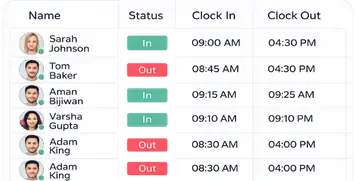
Office Punch triggers the clock-in automatically when an employee’s PC or laptop starts. Not when they remember to hit a button. Not when they open a browser. The instant the machine powers on, automated time tracking begins. This is employee time tracking software that removes the single biggest failure point — human action.
No forgotten timers. No retrospective time entries. No guesswork in your time tracking report. Office Punch is the time tracker that works without asking employees to remember anything.
Frequent, short-interval random screenshots
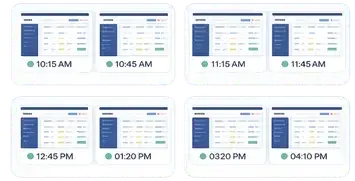
Office Punch captures screenshots at random intervals throughout the working day. The employee does not know when the next screenshot fires. The manager does not know. Nobody knows. Shorter intervals and genuine randomness mean every screenshot tells the truth — not what happened to be on screen during a predictable window.
This is what time tracking with screenshots is supposed to mean.
IP and geo-location restrictions that work on desktop
Office Punch enforces attendance at two levels simultaneously. IP-based restrictions allow punch-ins only from approved network addresses. Geo-location boundary enforcement restricts attendance to approved physical locations. Both controls operate on the desktop — where your employees actually work. Not through a mobile app. Not through GPS on a personal phone. At the machine level, where it matters.
Active vs idle — the full picture
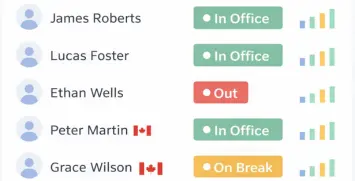
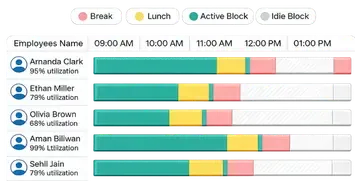
Office Punch tracks every working hour as active or idle. Managers see clearly how employees spend their time across the working day — not which task they clicked, not which project they assigned themselves to, but whether they were genuinely engaged or sitting idle. Clean activity data that helps you track productivity and measure productivity without the complexity of project management layers.
Secure desktop-based tracking for sensitive environments
Office Punch runs on the employee’s desktop. Admins access all activity data, reports, and audit trails through a web dashboard and web apps built for management visibility. There is no mobile app. There is no personal device access. For companies where data security and sensitive data protection are non-negotiable, keeping tracking tied to approved machines is not a limitation — it is the right architecture.
Feature comparison
Clockify feature information is accurate as of June 2026, based on publicly available plan pages. Features and plan availability are subject to change. Verify current Clockify plan details at clockify.me before making a purchasing decision.
| Office Punch | Clockify | |
|---|---|---|
| Time and attendance software | ✓ | Standard plan and above |
| Auto clock-in on system startup | ✓ | ✗ |
| Screenshot capture | ✓ Premium — short random intervals | ✓ Pro plan — 5-min window |
| Active vs idle activity tracking | ✓ | Idle detection available |
| IP-based punch restrictions | ✓ Desktop | ✓ Kiosk mode (paid plans) |
| Geo-location boundary enforcement | ✓ Desktop | Mobile GPS only |
| Desktop-based secure tracking | ✓ | ✓ |
| Web admin dashboard | ✓ | ✓ |
| Remote employee monitoring | ✓ | ✓ |
| Employee productivity monitoring | ✓ | Limited |
| Time tracking for developers | ✓ | ✓ |
| Agency time tracking | ✓ | ✓ |
| Time tracking for freelancers | ✓ | ✓ |
| Project time tracking | ✓ | ✓ |
| Audit log and audit trails | ✓ | Standard plan and above |
| Keystroke logging | ✗ | ✗ |
| Billable hours | ✗ | ✓ |
| Project management | ✗ | ✓ |
| Task management | ✗ | ✓ |
| Mobile app | ✗ | ✓ |
| Schedule shifts | ✗ | ✓ Paid |
| Microsoft Teams integration | ✗ | ✓ |
| Native integrations | Limited | 80+ |
| Free plan includes time tracking | ✗ Premium only | ✓ |
| No credit card required to start | ✓ | ✓ |
Why companies choose Office Punch over Clockify
Activity data that scales with team size
Whether you manage five employees or five hundred, Office Punch delivers the same activity monitoring framework. New hires get onboarded to the same system. Reports scale without reconfiguration. The employee monitoring system does not require add on modules or separate tools as your team grows. Software use stays simple regardless of team size.
Proof of work for freelancers, agencies, and developers — without the billing layer
Time tracking for freelancers usually means one thing: billable hours. Office Punch takes a different approach. Freelancers, agencies, and developers who need to demonstrate working hours — without client billing software — get a clean, verifiable record of time spent. Activity data. Random screenshots as evidence. A time tracking report that shows when work happened and what the screen showed. Proof of work, not a payment request.
Remote employee monitoring that does not rely on a phone
Most remote employee monitoring software assumes employees carry a phone. GPS tracking through a mobile app tracks field workers — not remote employees sitting at a desk. Office Punch monitors remote workers and remote teams through the desktop, where the actual work happens. Activity monitoring, random screenshots, and automated clock-in all run on the machine — giving you visibility into remote work without mobile dependency.
For distributed teams and remote employees across different locations, reliability is non-negotiable.
It is built for your job function — not a freelancer's invoice
Clockify is designed around one core workflow: log time against a project, mark it billable, send an invoice. That workflow does not match how most organizations run. HR managers, operations directors, and team leads do not need project profitability reports. They need to know when employees clock in, how long they work, and whether their activity data shows genuine engagement.
Office Punch is employee time tracking software built around that workflow — not retrofitted to it.
No "big brother" reputation — just structured accountability
Office Punch does not do keystroke logging. It does not track every website visited or map every app opened. It tracks working hours, records active versus idle time, and captures random screenshots. That is the line between monitoring software that builds accountability and surveillance that damages employee privacy and team trust.
For most organizations, respecting employee privacy while maintaining visibility is the balance that makes a monitoring system sustainable. Office Punch sits on the right side of that line.
The free plan is basic — the premium plan is complete
The Office Punch free plan is a basic access plan. Time tracking, activity monitoring, and screenshots are premium features. When you upgrade, you get the complete employee monitoring system: automated time on startup, random screenshot capture, active vs idle activity data, IP restriction, geo-location enforcement, and full admin reporting. Every feature designed to give management better visibility across the full working day.
Clockify’s free plan includes unlimited users and unlimited time tracking — a genuine advantage for teams where basic features are enough. But for companies where employee activity monitoring, unpredictable screenshots, and attendance security are the actual requirement, the premium Office Punch system delivers what Clockify’s free tier never will.
Office Punch is built for the way offices, agencies, and remote teams actually work.
If billing clients by the hour is your priority — Clockify handles that well.
If knowing when your team clocks in, whether they are active, and having unpredictable screenshot proof of work across your employees is what you need — Office Punch is the employee monitoring system built for exactly that.
The same working hours. Better evidence. Stronger attendance security.
What makes Office Punch different from Clockify as employee monitoring software?
Office Punch is attendance-first employee monitoring software built around automated clock-in, random screenshot capture, and IP plus geo-location enforcement. Clockify is time tracking software built around projects and billable hours. Both offer time tracking and screenshots, but Office Punch delivers unpredictable screenshots that cannot be anticipated, desktop-based location controls Clockify does not offer, and an employee monitoring system designed for workforce visibility rather than client invoicing.
Is Office Punch a better employee monitoring system for remote teams than Clockify?
Yes — for teams where attendance tracking and activity monitoring matter more than project billing. Office Punch ranks as the best employee monitoring software for companies that need desktop-based control. Office Punch is remote employee monitoring software that runs entirely on the desktop. Automated clock-in fires on system startup. Screenshots capture at random intervals. Active versus idle tracking delivers continuous employee productivity data throughout the working day. Remote workers cannot game the system because every control runs on the machine, not a mobile device they manage themselves.
Does Office Punch work as time tracking software for freelancers, agencies, and developers?
Yes. Office Punch offers time tracking for freelancers, agency time tracking, and time tracking for developers without billable hours or project management layers. Freelancers and agencies that need verified proof of working hours — activity data, random screenshots, and clean time tracking reports — get a complete monitoring software solution. The focus is on time spent and activity evidence, not client invoicing. Billing stays separate, in your own tools.
How does Office Punch handle data security compared to Clockify?
Data security is built into Office Punch’s architecture. Tracking runs on the employee’s desktop — not through mobile apps or personal devices — keeping sensitive data tied to approved machines. IP-based restrictions and geo-location boundary enforcement add access controls at the punch level. Clockify routes data through mobile apps and personal devices without equivalent desktop location enforcement. For companies where data security and employee activity data protection are non-negotiable, Office Punch’s approach reduces exposure by design.
Can Office Punch improve productivity monitoring without invasive surveillance?
Yes. Office Punch delivers employee productivity monitoring and better visibility into working hours through active versus idle tracking and random screenshot capture — without keystroke logging, app surveillance, or website monitoring. Managers get the automated time data and activity evidence they need to improve productivity across the team. Employees understand the system is fair, consistent, and tied to their desktop. That transparency builds trust while productivity monitoring remains effective across every job function and team size.