Managing a modern workforce requires a clear understanding of daily activity. Business owners today face new challenges in maintaining visibility. It is no longer about watching a desk. It is about understanding how employee computers are used during work hours. Employee productivity monitoring provides the data needed to lead effectively. This practice is not about employee surveillance. It is about creating a transparent system for remote and hybrid teams.
When you track employee productivity, you gain a clear view of your organization’s workflow. Identify top-performing individual employees and model their work patterns. Spot performance trends across remote teams and in-office staff. Set productivity benchmarks based on historical data to achieve greater productivity. Office Punch offers a professional way to secure this data. We help you build a culture of accountability and trust.
How can I improve employee productivity tracking?
Improving team productivity starts with the right tools and clear communication. You must move away from manual check-ins. Instead, use a monitoring system that works automatically.
A primary step is using automated time triggers. Your monitoring software should start when an employee turns on their PC or laptop. This ensures you capture the full workday without human error. It also removes the burden from team members. They can focus on their work immediately upon system startup.
- Implement Random Proof of Work: Use monitoring tools that take screenshots at random intervals. No one can predict when the capture happens. This provides an honest view of employee activity.
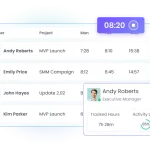
- Monitor Activity Levels: Use activity tracking to see active versus idle time. This helps you understand the employee workload.
- Analyze Software Usage: Look at which applications are open. This provides productivity insights into how employees spend their time.
- Set Geographic Boundaries: Use location tracking via geo-boundary enforcement. This ensures that attendance punches only happen at approved home or office locations.
By following these practices, you gain actionable insights. You can identify bottlenecks in the organization’s workflow. This allows team leaders to provide support where it is needed most.
Employee productivity tracking software vs manual tracking
Many small businesses still rely on trust and manual logs. While trust is vital, manual logs are often inaccurate. They lack data driven insights. Employee monitoring through manual methods increases administrative overhead. It leads to disputes over employee hours and attendance.
Employee monitoring software provides a secure alternative. It offers deep monitoring capabilities that manual logs cannot match. When you use an employee monitoring system, the data is objective. It tracks user activity in real time. This ensures data security and prevents data leaks.
Manual tracking cannot provide user behavior analytics. It cannot show you productivity trends over a month. A digital monitoring system generates customized reports in seconds. You can measure productivity by looking at activity logs and activity monitoring data. This allows for a more accurate resource allocation based on actual workforce utilization.
Security is the biggest advantage of a digital system. Manual logs have no protection against insider threat detection. Modern employee monitoring tools use access controls to protect employee data. They also use IP-based restrictions for attendance security. This prevents unauthorized log-ins and protects against data breaches.
Understanding the importance of data security and employee privacy
When implementing monitoring employee productivity, you must balance visibility with employee privacy. Employees should know what is being monitored. They need to know that the system protects their sensitive data.
Data security is a priority for OFFICE PUNCH. Our system uses robust access controls. This ensures that only authorized team leaders can view monitored data. We help you comply with local labor laws by focusing on professional activity.
- Data Loss Prevention: Monitoring helps prevent the unauthorized transfer of files.
- Insider Threat Detection: Identify unusual user behavior that might signal a security risk.
- Encourage Transparency: Share productivity data with employees to help them improve productivity.
Focusing on data security builds employee engagement. When workers know the system is fair and secure, they feel more comfortable. They see the monitoring software as a tool for professional growth rather than employee surveillance.
Key features of the best employee monitoring software
The best employee monitoring software provides a mix of security and visibility. You need monitoring tools that provide detailed tracking without slowing down the computer. Here are the key features to look for:
- System Startup Triggers: The tracking software should launch when the PC or laptop starts. This captures all employee activity from the beginning.
- Random Screenshots: Capture proof of work at unpredictable times. This is the most effective way to track employee productivity.
- Idle Time Detection: See when remote employees are away from their employee computers. This provides a clear view of active time spent.
- IP and Geo-Boundary Restrictions: Secure your attendance monitoring. Use these location tracking features to ensure employees are in the right place.
- Activity Logs: Review software usage and keystroke logging (where applicable) to understand team performance.
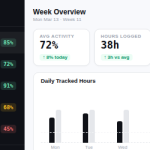
- Detailed Reports: Generate customized reports to see productivity metrics and performance metrics.
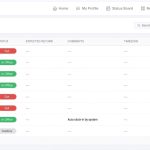
- Web Dashboard: Admins should remotely access data via a secure web dashboard.
These time tracking capabilities help you optimize productivity. They provide the productivity analysis needed to boost productivity across the board.
Improving team productivity through activity monitoring
Activity monitoring is the best way to improve productivity. It helps you see the reality of the workday. You can see how much time spent is productive. This helps you optimize workflows by removing distractions.
For remote employees, this visibility is crucial. It replaces the physical office environment. It allows team members to prove their dedication. When you measure productivity with activity tracking, you remove bias. Performance reviews become based on performance metrics rather than opinions.
- Identify Trends: Use productivity trends to see when the team is most active.
- Manage Workload: Use workforce analytics to see if some team members are doing more than others.
- Support Remote Workers: Use team communication tools alongside monitoring to provide support.
By using data driven insights, you can track progress toward company goals. You can see if employee performance is consistent. This leads to a more stable and successful company.
Why Choose Office Punch?
Office Punch is designed for the modern business owner. We focus on employee productivity monitoring that is secure and easy to use. Our monitoring software provides deep monitoring capabilities without the need for complex task management.
We understand that small businesses need to boost productivity without high costs. Our paid plans offer advanced features like random screenshots and geo-location restrictions. We provide detailed reports that give you actionable insights into your team.
Our system does not rely on a mobile app. We focus on secure, desktop-based tracking for remote employees. This ensures that work stays on work devices. Our responsive customer support is always ready to help you optimize workflows. Choose Office Punch for a reliable monitoring system that respects employee privacy while delivering results.
FAQ: Common Questions About Employee Monitoring
Does Office Punch use a mobile app for tracking?
No. Office Punch is a desktop-based employee monitoring software. It runs on PC and laptop systems. Admins can view productivity data through a secure web dashboard from any browser.
When does the monitoring start each day?
The monitoring software triggers automatically on system startup. Once the employee turns on their computer, the activity monitoring begins. This ensures no employee hours are missed.
Are the screenshots taken at specific times?
No. Screenshots are captured at random intervals. Because they are unpredictable, they provide a true representation of employee productivity throughout the day.
How do geo-location and IP restrictions work?
Office Punch allows admins to set geo-boundaries and approved IP addresses. This ensures that attendance punches only occur from authorized locations. This is a key feature for data security and attendance accuracy.
Is there a free version of the software?
Yes. Office Punch offers a free plan. However, the free plan is a limited-access version. Features like activity tracking, random screenshots, and detailed reports are only available on our paid plans.
Conclusion
Implementing an employee monitoring system is a strategic move for any business. It provides accurate tracking needed to improve productivity and secure employee data. By choosing a professional monitoring software, you protect your organization. You replace guesswork with data driven insights. You eliminate the administrative overhead of manual tracking. Focus on the long-term benefits of visibility, security, and fairness. Your team will be more engaged, and your business will be more resilient. Start your journey toward better team productivity today with Office Punch.
Ready to gain better visibility into your team’s workday? Discover how automated activity monitoring and secure attendance tracking can transform your business. Visit OFFICE PUNCH today to explore our professional monitoring tools.
Tags