Time Tracking Software - Office Punch Vs WebWork Time Tracker
Purpose-built attendance control, desktop-first monitoring, and proof of work for companies that need more than a timesheet tool.

Two different tools built for two different jobs
WebWork Time Tracker is a capable, full-featured time tracking software. It serves distributed teams, agencies, and businesses that need project management, task management, billable hours, invoicing, and mobile app access across field and remote teams. For those use cases, it delivers.
Office Punch is built around a different set of priorities. It focuses on attendance tracking, employee activity monitoring, and desktop-based proof of work for companies managing office-based and remote employees. It does not do billing. It does not do project management. It does one thing with depth — give management an accurate picture of when employees are at work and what they are doing while they are there.
Both are legitimate monitoring software solutions. The question is which one fits your job function.
Throughout this comparison, time tracking refers to attendance-based work hour tracking, employee activity visibility, productivity monitoring, and attendance tracking. It does not refer to project management, task management, project profitability, billable hours, or client billing. Office Punch focuses on helping companies track employee time, monitor employee activity, and gain better visibility into working hours through desktop-based employee monitoring software.
What Office Punch Delivers
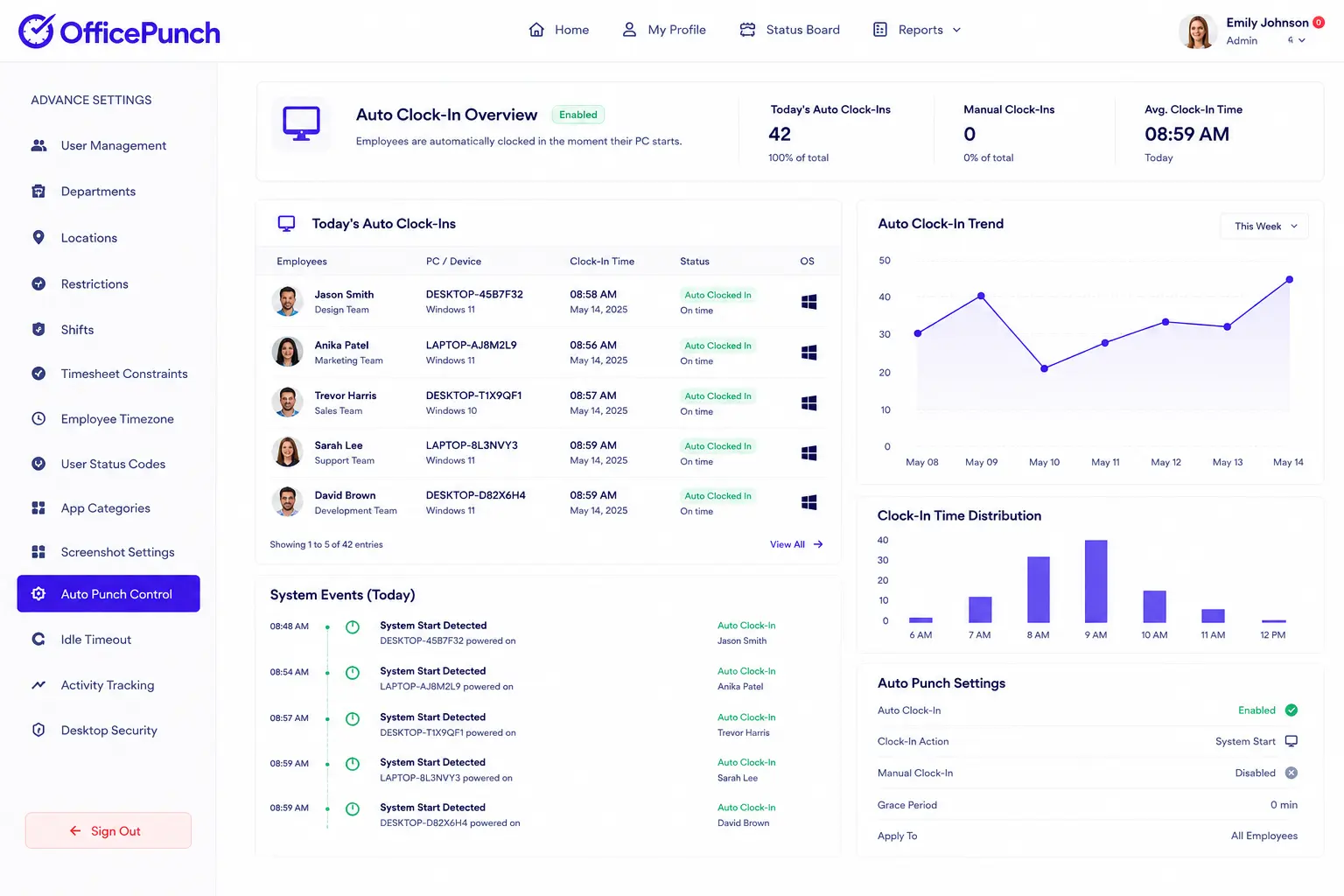
Auto clock-in that runs without employee input
Office Punch triggers automated time tracking the moment an employee’s PC or laptop powers on. There is no timer to start. There is no app to open. No employee action is required at any point.
Attendance records and employee time logs are created automatically from system startup. Working hours data reflects what happened — not what an employee remembered, chose to start, or submitted at the end of the day. For most organizations managing new hires, remote employees, or larger businesses with distributed teams, that automation removes the biggest source of inaccurate employee time records.
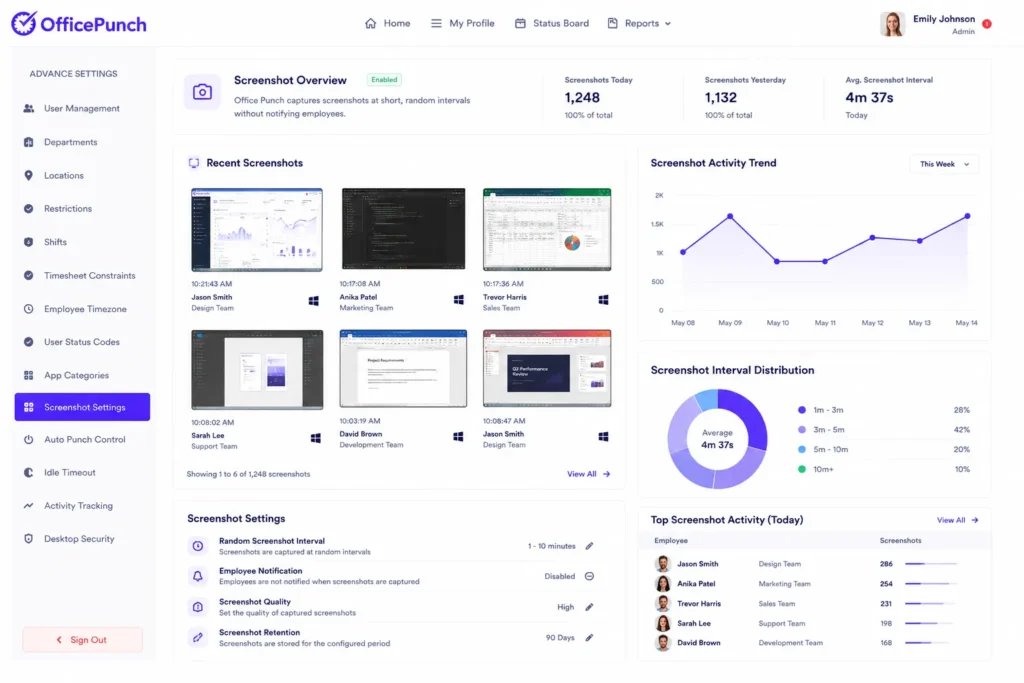
Short-interval random screenshots — without a notification
Office Punch captures screenshots at short, fully random intervals throughout the working day. Employees do not receive a notification when a screenshot fires. The timing is unpredictable for both the employee and the manager.
When employees do not know when the next screenshot will appear, every screenshot delivers an honest, accurate picture of user activity. The result is activity data that management can rely on without second-guessing what was on screen thirty seconds before the capture.
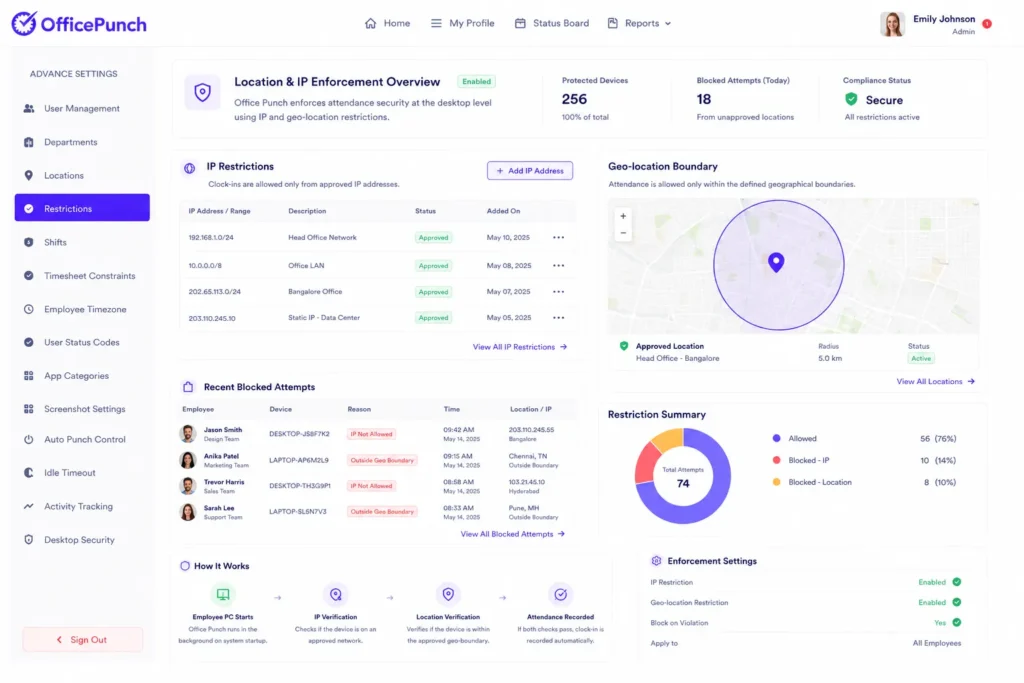
IP and geo-location enforcement at the desktop level
Office Punch enforces attendance security at two levels on the desktop:
IP-based restrictions — Clock-ins occur only from approved network addresses
Geo-location boundary enforcement — Attendance registers only from approved physical locations
Both controls operate at the machine level. Employees cannot punch in from an unapproved location or an unapproved network. For companies where data security and sensitive data protection are non negotiable, tying attendance controls to the desktop reduces exposure that mobile-based location enforcement cannot address.
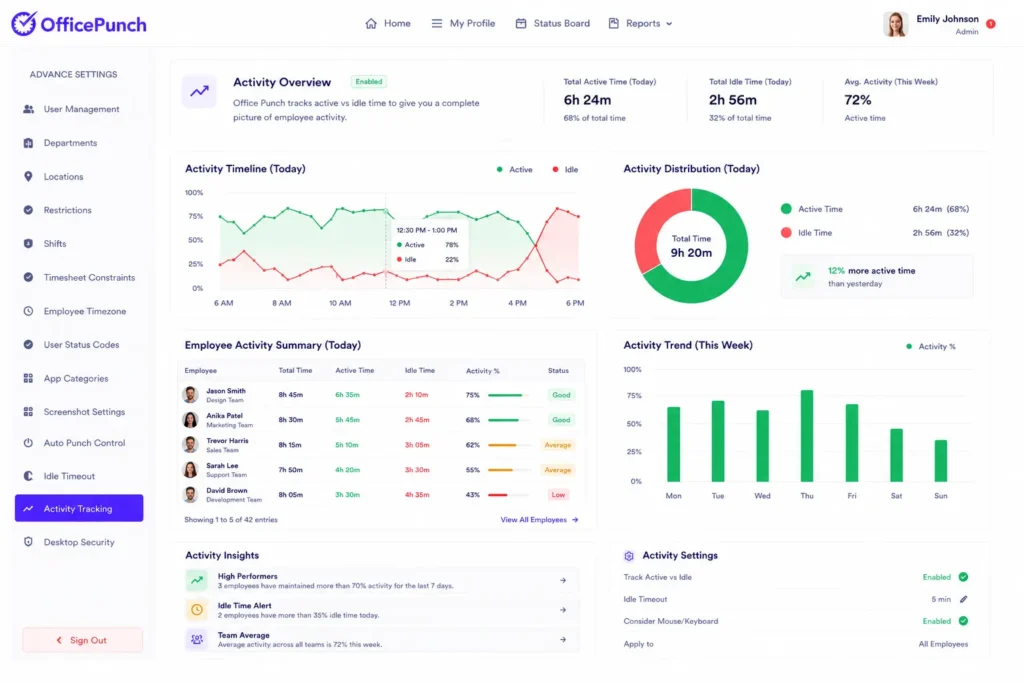
Active vs idle — the full employee activity picture
Office Punch tracks every working hour as active or idle. Managers see clearly how employees spend their time across the working day — not which project was assigned, but whether genuine engagement happened or not.
This employee activity visibility helps companies improve productivity and measure productivity without requiring employees to log tasks or self-report their working hours. The activity data speaks for itself, and it builds over time into powerful reporting that shows trends across teams and individuals.
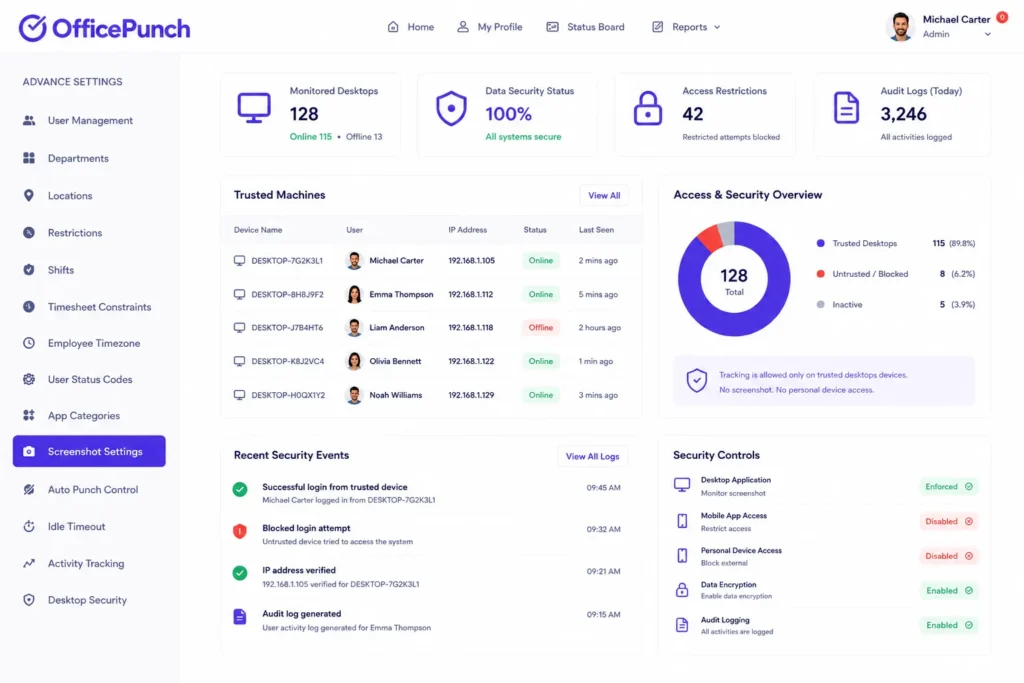
Desktop-based architecture designed for data security
Office Punch runs entirely on the employee’s desktop. Admins access all activity monitoring data, audit trails, audit log records, and reports through a secure web dashboard and web apps. There is no mobile app. There is no personal device access to company monitoring data.
For companies where sensitive data and employee privacy operate within strict boundaries, a desktop-first architecture means tracking stays tied to approved machines — not personal phones, not personal apps, not personal cloud accounts.
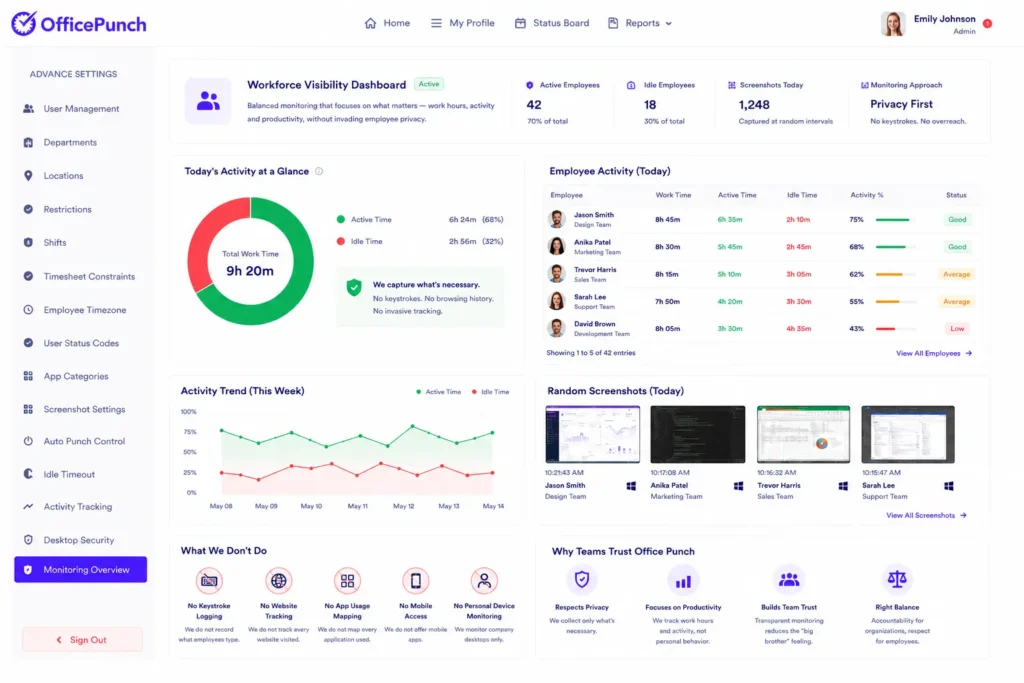
Workforce visibility without a "big brother" reputation
Office Punch does not do keystroke logging. It does not track every website an employee visits or map every application they open. It tracks working hours, records active versus idle employee time, and captures screenshots at random intervals.
That is structured accountability — not surveillance. For companies where employee privacy matters alongside productivity monitoring, Office Punch sits on the right side of that line. The employee monitoring system delivers what management needs without creating the “big brother” tension that erodes team trust.
How the two platforms compare
WebWork feature information is accurate as of June 2025 based on publicly available product and plan pages. Features and plan availability are subject to change. Verify current WebWork details at webwork-tracker.com before making a purchasing decision.
| Feature | Office Punch | WebWork |
|---|---|---|
| ATTENDANCE | ||
| Auto clock-in on system startup | ✓ Always automatic | ✓ Silent mode only |
| Screenshots | ✓ Short random intervals, no notification | ✓ Configurable, employee notification default |
| Attendance tracking | ✓ | ✓ |
| IP-based attendance restrictions | ✓ Desktop | ✓ Available |
| Geo-location enforcement | ✓ Desktop-based geo boundary enforcement | ✓ Available |
| EMPLOYEE ACTIVITY | ||
| Active vs idle activity tracking | ✓ | ✓ Keyboard & mouse activity |
| Keystroke logging | ✕ | ✓ Activity level via keyboard & mouse |
| WORKFORCE MANAGEMENT | ||
| Shift scheduling / Schedule shifts | ✕ | ✓ |
| PROJECT MANAGEMENT | ||
| Project management | ✕ | ✓ |
| Task management | ✕ | ✓ |
| Billable hours and invoicing | ✕ | ✓ |
| Project profitability reporting | ✕ | ✓ |
| REPORTING & AUDIT | ||
| Audit log and audit trails | ✓ | ✓ |
| Powerful reporting | ✓ | ✓ |
| INTEGRATIONS | ||
| Native integrations | Limited | ✓ Multiple |
| Microsoft Teams integration | ✕ | ✓ |
| PLATFORM & SUPPORT | ||
| Mobile app | ✕ | ✓ |
| Phone support | ✓ | ✓ |
| Unlimited users | ✓ | ✓ |
| No credit card required to start | ✓ | ✓ 14-day trial |
| Free plan available | ✓ Basic plan | ✓ |
Why companies choose Office Punch
Remote employee monitoring without mobile dependency
Remote workers who work from a desk present a monitoring challenge that many monitoring approaches do not fully address. Office Punch monitors remote employees through the desktop — where the actual work happens. Time spent, activity data, and screenshot evidence all come from the machine, not a personal device.
For remote teams and distributed teams across different time zones, that consistency matters. The same monitoring framework applies to every employee regardless of location — as long as they are on an approved machine connected through an approved network.
Proof of work for teams that need it — without the complexity they do not
Agencies, developers, and remote employees who need verifiable working hours records get a clean, auditable system with Office Punch. The time tracker creates automated attendance records and employee time tracking data from system startup. Screenshot captures provide visual proof at short, unpredictable intervals. Audit log records and audit trails maintain a complete, timestamped history of employee time and activity.
For companies where proving working hours to clients or internal stakeholders is non-negotiable, Office Punch delivers that proof without requiring employees to submit timesheets, log tasks, or self-report anything.
The employee monitoring system built around attendance — not billing
Most organizations that evaluate employee monitoring software fall into two categories. The first needs a billing and project tool that also monitors employees. The second needs an employee monitoring system focused on when people work, whether they are active, and whether attendance data is accurate.
Office Punch is built for the second group. Every employee monitoring feature — from automated time tracking on startup to random screenshot capture to IP and geo-location enforcement — connects to one goal: giving management better visibility and the ability to track productivity and track time accurately — without relying on self-reported data, without the overhead of project management or client billing tools.
Scales cleanly with team size
Whether a business manages ten employees or several hundred, Office Punch delivers the same employee monitoring framework. New hires join the same system. Reports scale without reconfiguration. Software use stays consistent as team size grows. There are no add on modules or separate tools required to unlock the core monitoring features that make the system valuable at scale.
The free plan provides basic features and limited access for businesses evaluating the platform. Time tracking software functionality, activity tracking, productivity monitoring, screenshot capture, employee monitoring, and advanced reporting are available on the Premium plan. Businesses can explore Office Punch with no credit card required before deciding whether Premium is the right fit for their workforce management needs.
Office Punch is built for companies that need attendance control and proof of work — not a timesheet tool.
If project management, billable hours, invoicing, and mobile app tracking across distributed teams are your priority — WebWork covers that ground well.
If knowing when your employees clock in, whether they are active, and having short-interval, unpredictable screenshot proof of work across your desktop workforce is what your business needs, Office Punch is the employee monitoring system built for exactly that.
Real attendance data. Clean activity monitoring. Desktop-level security.
What makes Office Punch different from WebWork as employee monitoring software?
Office Punch is an employee monitoring system focused on attendance tracking, automated time tracker entries, and desktop-based proof of work. It captures screenshots at short, random intervals — with no notification — so activity tracking data reflects what employees actually do during working hours. For most organizations using time tracking software to manage customers and employees, this non negotiable focus on accuracy makes it the best employee monitoring software for desktop workforce visibility. Tracking software that posts data automatically — with no employee input — gives companies a reliable foundation for measuring how teams work. WebWork serves a broader use case including project management, task management, and mobile app access.
Is Office Punch the best employee monitoring software for remote and distributed teams?
Office Punch delivers structured employee monitoring for remote employees and distributed teams. Automated time tracking starts on system startup — no employee input required. The time tracker logs user activity, activity data, and active versus idle time throughout the working day. Managers see exactly how remote workers and remote employees spend their working hours. This gives companies an accurate picture and better visibility without relying on time entries employees submit manually. Measure productivity across distributed teams with real data — not estimates. For remote work environments where data security and sensitive data protection are non negotiable, the desktop-first architecture reduces risk across any team size.
Does Office Punch work without becoming a "big brother" monitoring tool?
Yes. Office Punch delivers productivity monitoring and employee activity visibility without keystroke logging, and without tracking every website or app employees use. Screenshots fire at short random intervals. Audit trails and audit log records give management a clean, defensible record of working hours and user activity. Employees understand the system is consistent and tied to their desktop. That balance between employee privacy and activity monitoring builds accountability without creating the “big brother” tension that damages team trust across remote teams and larger businesses.
What employee monitoring features does Office Punch include and how does it scale?
Office Punch includes automated attendance records and employee time tracking from system startup, short-interval random screenshots, active versus idle activity monitoring, IP-based attendance restrictions, geo-location boundary enforcement, audit log access, audit trails, and powerful reporting across all employee activity data. There are no add on modules required for core monitoring. The solution scales cleanly with team size — new hires join the same system, reports scale with the business, and software use stays consistent across unlimited users and multiple locations.
How does Office Punch serve freelancers, agencies, and teams without project profitability tools?
Office Punch gives freelancers, agencies, and remote employees a verifiable record of working hours and employee time without billing or project profitability features. Time spent gets logged automatically from system startup. Activity tracking data, screenshots, and audit trails provide proof of work that supports client reporting through your own tools. For companies with remote workers who need time tracking software with basic features covering employee productivity, improve productivity tools, or customer-facing billing, those requirements guide the final tool selection. Start monitoring with Office Punch when the core need is accurate working hours and verifiable activity data across your teams.