Key Takeaways
- Most project hour estimates fail because they rely on guesswork rather than historical time data.
- Time tracking software builds a database of actual hours spent — the foundation of accurate estimates.
- Accurate project estimation uses historical data to predict timelines and resource needs.
- Automated time tracking reduces manual entry errors and produces more reliable data.
- Task-level tracking reveals where hours actually go — not where teams assume they go.
- A free plan is often enough for small teams to start building historical time data.
- Better estimates reduce budget overruns, missed deadlines, and team burnout.
Estimating project hours accurately is one of the hardest operational challenges for managers. Most estimates rely on intuition — or the last project’s numbers, adjusted upward. They are wrong almost every time. Time tracking software changes this. It replaces guesswork with actual recorded data. Over time, that data builds into a reliable reference for every estimate you make. This guide explains how to use time tracking to make estimates that hold up.
Why Project Hour Estimates Are Almost Always Wrong
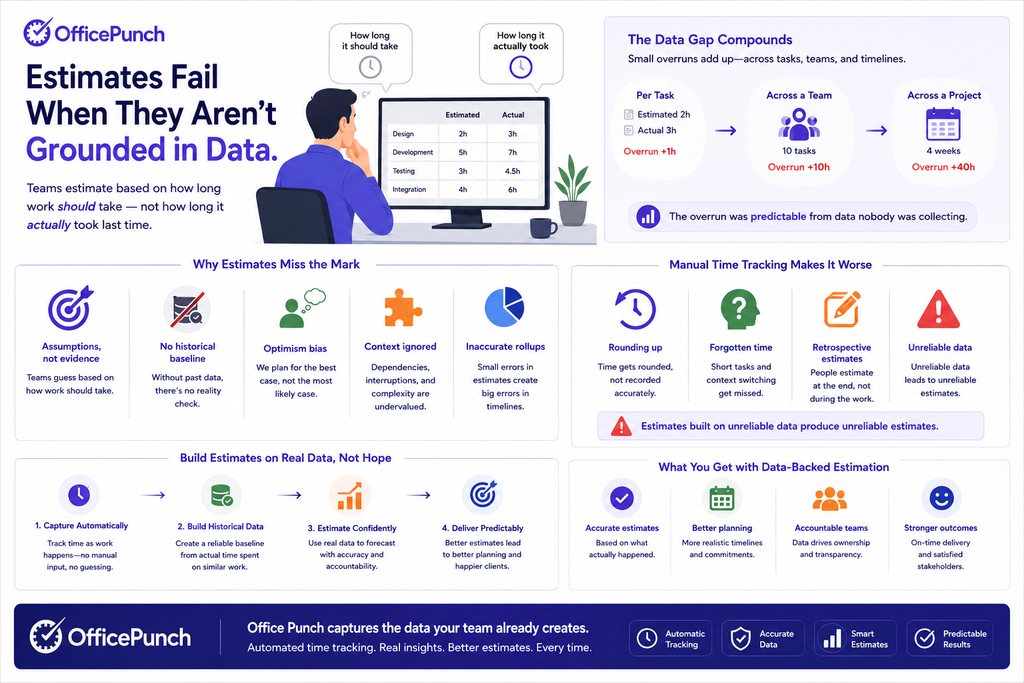
Estimates fail for one consistent reason: they are not grounded in data. Teams estimate based on how long work should take — not how long it actually took last time.
The gap between estimated and actual hours compounds across projects. A task estimated at two hours takes three. Multiply that across a team and a timeline. The overrun was predictable from data nobody was collecting.
Manual time tracking makes this worse. Teams round up, forget short tasks, and estimate retrospectively. The data is unreliable. Estimates built on unreliable data produce unreliable estimates.
How Time Tracking Software Solves This
Time tracking software exposes bottlenecks in workflow processes. According to CPHR Canada, accurate time data is foundational to both workforce planning and performance management. It captures exactly how long tasks take — automatically. Over time, it builds a historical record managers can query before estimating any new project.
- Track time at the task level. Log hours against specific task types.
- Build a reference library. After several projects, patterns emerge. Task X consistently takes Y hours.
- Apply historical averages. Replace guesswork with data.
- Adjust for team capacity. Historical data captures capacity variation too.
Accurate project estimation uses historical data to predict timelines. It is the natural output of consistent time tracking.
What to Track for Better Estimates
Not all time data is equally useful for estimation. Track at the right level of detail.
Track by Task Type — Not Just Project
Project-level totals hide where time actually goes. A project logged as “40 hours” tells you nothing. Broken down by task — planning, execution, review, revision, communication — it tells you everything.
Time tracking encourages better awareness of how time is spent. When teams discover that — in a hypothetical example — 30% of hours go to revision, estimation improves immediately. Future estimates account for revision time explicitly — not assuming first drafts always deliver.
Track Recurring Tasks Separately
Recurring tasks — weekly reporting, regular check-ins, recurring administrative work — consume predictable time. Track them separately. They should not inflate project estimates. They belong in team capacity planning.
Include Idle Time and Interruptions
Idle time detection identifies when a user steps away. Capturing this alongside active time gives a more honest picture of productive hours per day. Good estimates account for realistic productive hours — not theoretical ones.
The Role of Automated Time Tracking
Automatic time capture removes the need for manual timers. Automatic time tracking minimizes manual entry by logging apps and websites used throughout the day. This produces time data that reflects reality rather than memory.
Automated time tracking reduces manual entry errors. It removes the rounding and estimation that make manual time logs unreliable for historical analysis. When every minute is captured accurately, the averages you build for future estimates are accurate.
Real-time tracking allows users to monitor tasks instantly. Editing time entries helps correct accidental tracking errors before they pollute the historical record.
Key Features to Look for in a Time Tracking App
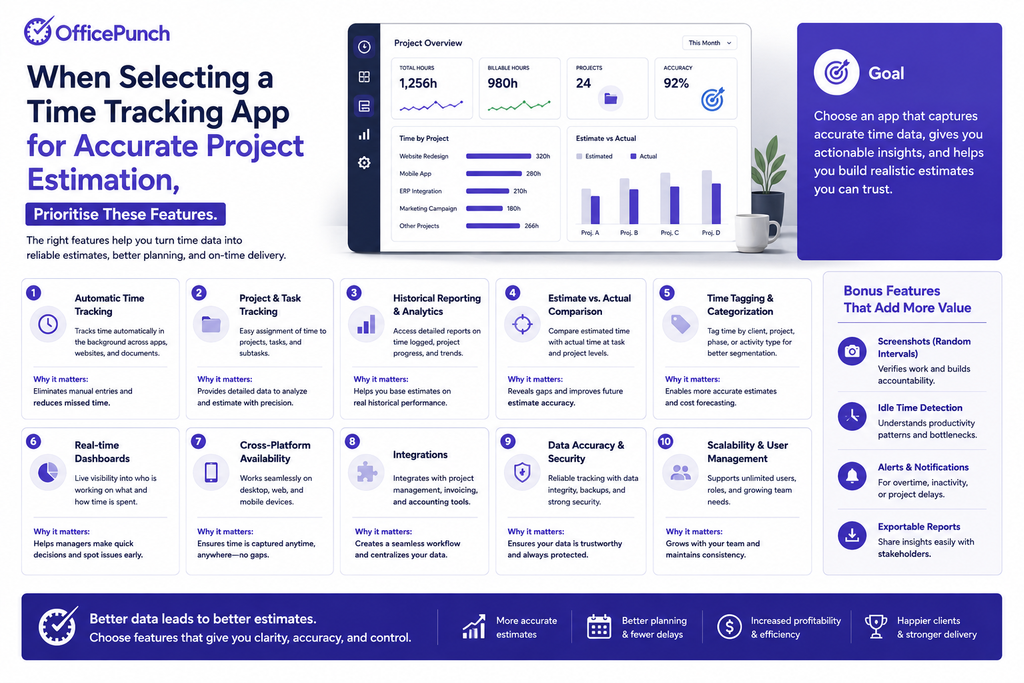
When selecting a time tracking app for accurate project estimation, prioritise these features.
Reporting Tools and Detailed Reports
Reporting features provide insights on time spent per project, task type, and team member. The Conference Board of Canada links data-driven workforce decisions to measurable productivity gains. The best reporting tools generate visual breakdowns of where hours go. Saved reports allow you to compare similar projects side by side. Custom reports let you slice data by any dimension relevant to your estimation process.
Task-Level Tracking
A good tracking app should support time entries tagged by work type or phase — creating a structured dataset for personal productivity tracking and future reference.
Desktop App
A desktop app captures time automatically in the background. Multiple access points enable tracking from different devices. Together, they ensure complete time data without requiring manual starts and stops from employees.
Free Plan for Small Teams
A free plan is often the right starting point for small teams. The best management software for hour estimation doesn’t require complex project management features from day one. Start with basic time entries and build toward advanced reporting as your data grows. Most free plans include basic logging, time entries, and simple reporting. This is enough to begin collecting the historical data that improves estimates over time. As reporting needs grow, paid plan features add custom reports, advanced reporting, and deeper analytics.
Turning Time Data Into Better Estimates
Once you have several months of tracked data, use it systematically.
Build a Task Duration Reference
List common task types. Pull average tracked hours from your time logs. Create a reference table. Use it as the starting point for every new estimate.
Add a Buffer Based on Variance
Historical data shows not just averages but variance. If task X averages three hours but ranges from two to five, estimate four — not three.
Review After Every Project
Compare estimated hours to tracked hours by task. Identify where estimates were consistently off. Adjust your reference table. Each project makes the next estimate more accurate.
Why Office Punch Gives You the Time Data Estimates Depend On
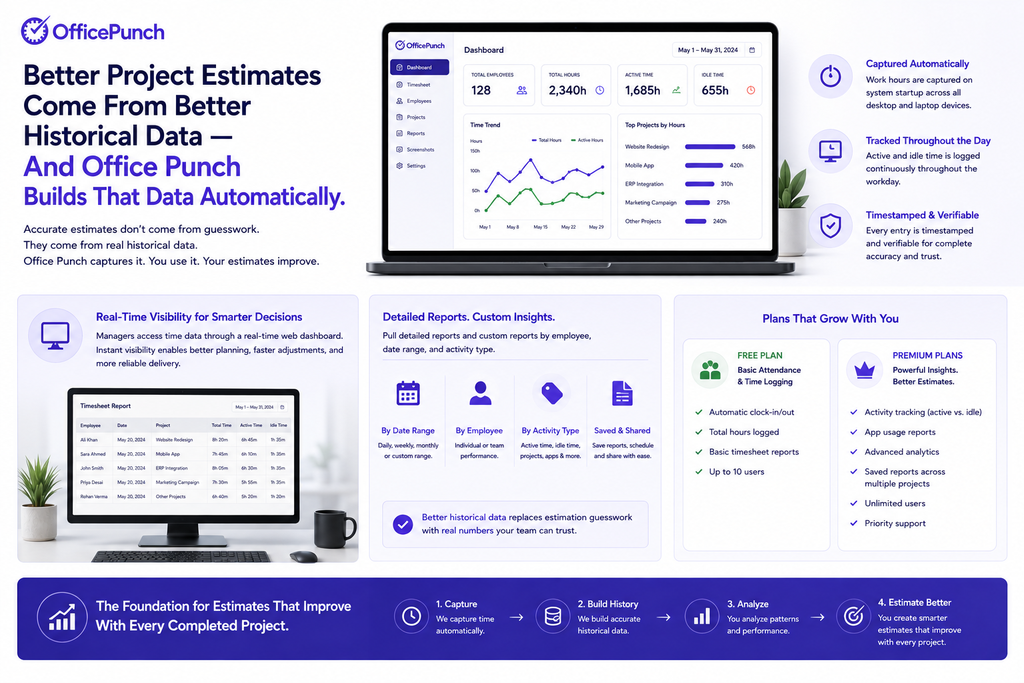
Better project estimates come from better historical data — and Office Punch builds that data automatically. Work hours are captured on system startup across desktop and laptop devices. Active and idle time is logged throughout the workday. Every entry is timestamped and verifiable.
Managers access time data through a real-time web dashboard. Detailed reports and custom reports can be pulled by employee, date range, and activity type — giving teams the historical reference they need to replace estimation guesswork with real numbers. The free plan covers basic attendance and time logging. Premium plans add activity tracking, app usage reports, advanced analytics, and saved reports across multiple projects — the foundation for estimation that improves with every completed project.
Want to build better project estimates from real time data? Book a demo with Office Punch and see how automated time tracking gives Canadian teams the historical data they need to estimate accurately, every time.
Frequently Asked Questions
How does time tracking software and management software improve project hour estimates?
Time tracking software records actual hours spent on tasks and projects. Over time, this builds a historical database of real durations. When estimating new projects, managers use past data rather than guesswork. Accurate project estimation uses historical data to predict timelines. This removes the optimism bias that makes most estimates wrong. Task-level tracking is the most useful level — it shows where time actually goes, including billable hours versus overhead, not just project totals.
What time tracking app features matter most — and when does employee monitoring software add value?
For project estimation, the most valuable time tracking app features are task-level time entries, detailed reporting tools, saved reports for comparing similar projects, and custom reports for extracting specific time data. A desktop app that captures time automatically produces more reliable data than manual entry. The more complete and accurate the historical record, the better the estimates built from it.
Is a free plan enough, or do you need a paid plan to track billable hours and project hours accurately?
For small teams starting out, a free plan is often enough. A free plan on most time tracking apps covers basic time entries, project-level logging, and simple reports. This is sufficient for small teams building their first historical time reference. After several months of consistent tracking, patterns emerge that improve estimation meaningfully. As reporting needs grow — custom reports, advanced analytics, multi-project comparisons — a paid plan adds the features needed for deeper estimation analysis.
How does employee monitoring software support project estimation?
Employee monitoring software that tracks active time, app usage, and idle periods shows how work hours are actually distributed. This reveals realistic productive hours per day — a critical input for estimation. When estimates assume theoretical eight-hour days rather than actual productive hours, they consistently underestimate project duration.
How do tracking tools support resource scheduling and capacity planning?
Tracking tools build a historical record of how long tasks take for each team member. This reveals individual capacity — not just team averages. Managers reference actual tracked hours to match task complexity with individual capacity. Workload allocation improves by comparing hours across projects. Burnout prevention is also supported — overtime patterns in time data signal capacity problems before they become crises.