Key Takeaways
- Idle time refers to periods when employees are paid but not performing productive tasks.
- Idle detection monitors keyboard and mouse activity during logged work hours.
- Industry practice typically sets idle time thresholds between 5 and 15 minutes.
- Idle time data signals process inefficiency — not individual failure.
- High idle time can distort performance metrics and complicate workload assessments.
- Canadian employers must disclose idle time monitoring before deployment.
- Remote and distributed teams benefit most from consistent idle time tracking.
Idle time detection is a feature in modern time tracking software that identifies periods of employee inactivity during work hours. It records when keyboard and mouse activity stops and flags those gaps as idle time. For Canadian employers managing remote teams or distributed teams, this data can reveal genuine productivity patterns. But it can also generate noise — misreading legitimate thinking, reading, or phone-based work as inactivity. This guide explains when idle time data signals something real and when it misleads.
What Is Idle Time?
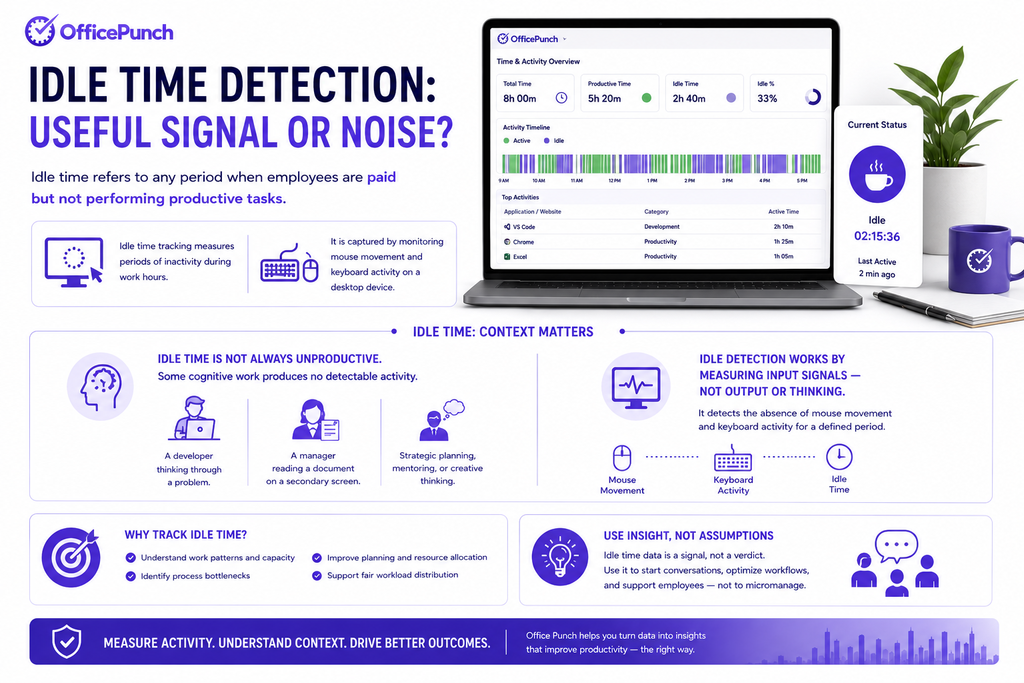
Idle time refers to any period when employees are paid but not performing productive tasks. Idle time tracking measures periods of inactivity during work hours. It is captured by monitoring mouse movement and keyboard activity on a desktop device.
Idle time is not always unproductive. Some cognitive work produces no detectable activity. A developer thinking through a problem. A manager reading a document on a secondary screen. Idle detection works by measuring input signals — not output or thinking.
How Idle Detection Works
Automatic idle detection monitors mouse activity and keyboard input continuously during tracked hours. When activity stops for a defined period, the idle timer begins. When activity resumes, the idle period is closed and logged.
Most idle time tracking software allows employers to set custom inactivity thresholds. The threshold defines how long inactivity must continue before it is logged as idle time. Industry practice typically sets idle time thresholds between 5 and 15 minutes. Short thresholds generate more idle time data. Longer thresholds reduce noise from brief natural pauses.
What Gets Flagged as Idle
- Extended periods with no keyboard or mouse input
- Sessions where the screen is locked
- Periods where app usage drops to zero
- Inactive periods after the computer has been idle for longer than the threshold
Automated alerts can notify managers of excessive employee inactivity. This enables intervention in real time rather than at the end of the pay period.
Active and Idle Time: The Core Distinction
The distinction between active and idle time is the foundation of productivity monitoring. Active time reflects periods of verified device engagement. Idle time reflects periods with no detected input.
Together, active and idle time produce a productivity ratio for each employee across tracked hours. For service businesses, this ratio directly affects billable hours accuracy. This ratio — when read correctly — reveals genuine productivity patterns. It shows when work is concentrated, when it drops off, and whether hours are being used effectively.
When Idle Time Data Is a Useful Signal
Idle time data becomes a useful signal in three situations.
Identifying Productivity Bottlenecks
Extended idle periods follow patterns. They cluster around specific times or team members. This signals a workflow problem. Waiting for approvals can cause significant idle time. Poor communication is a major contributor. Idle time tracking helps identify productivity bottlenecks invisible to output data alone.
Measuring the Impact of Process Changes
When a new workflow or tool is introduced, idle time data shows whether behaviour changed. Trend analysis before and after provides objective evidence. Turn raw time data into insight — not assumption.
Monitoring Excessive Unproductive Time
Frequent idle time disrupts operational momentum. Idle time can decrease output and lead to missed deadlines. When an idle time tracker reveals consistent excessive idle time for one employee, it surfaces a conversation worth having — about workload, tools, or engagement.
When Idle Time Data Is Noise
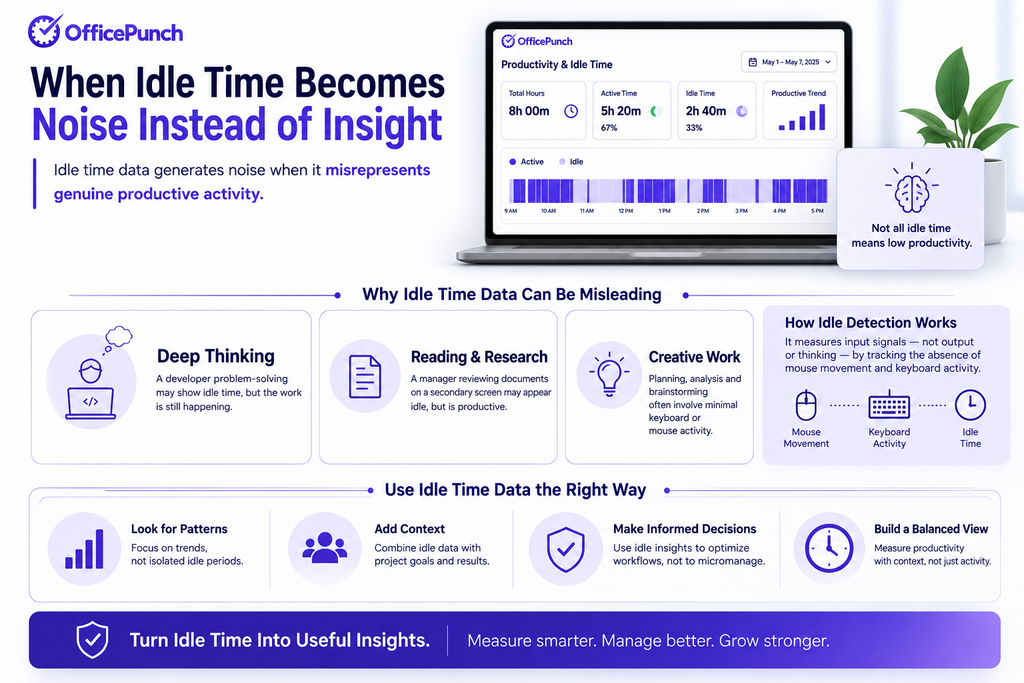
Idle time data generates noise when it misrepresents genuine productive activity.
Cognitive Work Leaves No Trace
Reading, thinking, planning, and reviewing documents generate no keyboard or mouse activity. An employee deep in analysis may appear idle for 20 minutes. The entry is technically correct. But it reflects the limits of input-based detection — not unproductive time.
Video Calls and Phone-Based Work
Video calls are active work. They may not register as computer activity. A salesperson on a client call generates no mouse movement. Context matters when interpreting idle time entries.
Using Idle Time Data Constructively
Idle time data should be used constructively — never punitively. Idle time can cause employee frustration when monitored without transparency. Employees can claim idle time by describing their activities during inactivity. This separates legitimate pauses from genuine disengagement.
Setting Custom Inactivity Thresholds
Idle time detection settings should be configured to match the work type. Set custom inactivity thresholds by role:
| Role Type | Suggested Idle Threshold |
|---|---|
| Data entry, support | 5 – 7 minutes |
| Knowledge workers | 10 – 15 minutes |
| Developers, analysts | 15 – 20 minutes |
| Managers, strategists | 20+ minutes |
Custom inactivity thresholds reduce false positives. They acknowledge that different roles produce different activity patterns.
Idle Time Tracking Legal Considerations in Canada
Idle time tracking is a form of employee monitoring. In Canada, employers must disclose monitoring practices to employees before deployment. This applies under PIPEDA federally and under equivalent provincial privacy laws in BC, Alberta, and Quebec.
Ontario’s Working for Workers Act, 2022 (S.O. 2022, c. 7) requires employers with 25 or more employees to maintain a written electronic monitoring policy. This must disclose what is monitored — including idle detection — and how data is used. See Ontario Ministry of Labour guidance for specifics.
High idle time data is sensitive data. It must be stored securely. Access must be restricted to authorised managers.
Remote Teams and Distributed Teams
Idle time monitoring is most valuable for remote employees and distributed teams. Managers cannot observe work patterns directly. Idle time data replaces subjective impression with tracked hours and activity records.
Poor scheduling can leave employees without active tasks. Cross-training allows for better resource allocation during idle periods. Idle time data surfaces these issues. It turns raw time data into operational intelligence.
Why Office Punch Handles Idle Time Detection Correctly
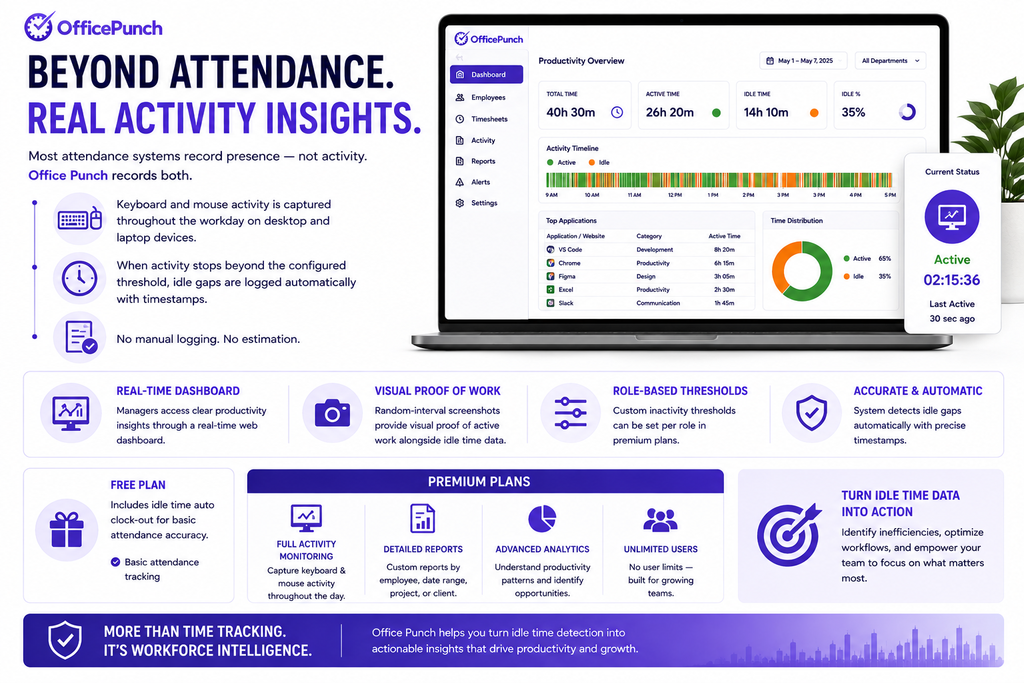
Most attendance systems record presence — not activity. Office Punch records both. Keyboard and mouse activity is captured throughout the workday on desktop and laptop devices. When activity stops beyond the configured threshold, idle gaps are logged automatically with timestamps. No manual logging. No estimation.
Managers access clear productivity insights through a real-time web dashboard. Random-interval screenshots provide visual proof of active work alongside idle time data. Custom inactivity thresholds can be set per role in premium plans. The free plan includes idle time auto clock-out for basic attendance accuracy. Premium plans add full activity monitoring, detailed reports, and advanced productivity analytics — the tools needed to turn idle time detection into actionable workforce insight.
Want accurate idle time data for your Canadian team? Book a demo with Office Punch. See how idle time detection gives employers the signal they need — without the noise.
Frequently Asked Questions
What is idle time, and how does it affect billable hours in time tracking software?
Idle time refers to paid work hours during which no keyboard or mouse activity is detected. Time tracking software identifies idle periods by monitoring device input continuously. When activity stops beyond a set threshold, the idle timer begins and the period is logged. Industry practice typically sets idle time thresholds between 5 and 15 minutes. Remote employees rely on idle time tracking for objective productivity data without direct supervision.
Is idle time the same as unproductive time?
Idle time and unproductive time overlap — but not entirely. Active and idle time are measured through device input signals. Genuine productive activities like reading, thinking, or taking calls may not register as active. Idle time data is a signal, not a verdict. Effective idle time monitoring pairs detected idle time with context — meeting logs or app usage data — to distinguish disengagement from legitimate cognitive work.
Is idle time tracking legal in Canada?
Idle time tracking is legal in Canada when employers disclose monitoring to employees before deployment. Canadian privacy laws require employers to inform employees of what is monitored and why. Ontario employers with 25+ employees must maintain a written electronic monitoring policy under the Working for Workers Act, 2022. Idle time data is sensitive data and must be stored securely with restricted access.
How should managers use idle time data constructively?
Idle time data is most useful for identifying productivity bottlenecks and process inefficiencies — not evaluating individual performance in isolation. When extended idle periods appear consistently, managers should investigate root causes: waiting for approvals, unclear tasks, or broken tools. Employees should have the opportunity to explain idle time entries before any conclusions are drawn.
What idle time thresholds should employers set for remote employees?
Remote employees benefit from longer idle time thresholds. A threshold of 10 to 15 minutes suits most knowledge workers. This accounts for natural pauses without flagging legitimate cognitive work as idle. Set custom inactivity thresholds by role or team. Review idle detection settings regularly as work patterns evolve across the entire team.