Across North America, employers using geofenced clock-in systems and desktop monitoring tools face a clear legal obligation: inform your employees before any tracking begins. In Canada, this is not a best practice — it is a requirement under federal and provincial privacy legislation. This post explains exactly what Canadian law demands, how each major province handles electronic monitoring disclosure, and what a compliant disclosure programme looks like in practice for employers using tools like OfficePunch.
Key takeaways
- Canadian privacy law requires employers to inform employees of electronic monitoring before it begins; covert monitoring of personal information without consent is not permitted under PIPEDA, Quebec’s Law 25, or BC/Alberta’s PIPA.
- Ontario employers with 25 or more employees must maintain a written electronic monitoring policy and provide it to all staff within 30 days of implementation, under the Employment Standards Act, 2000.
- OfficePunch’s geo restriction and IP restriction features verify attendance at a defined location or network — they are desktop-level clock-in gates, not GPS tracking systems, and do not track employee location continuously.
- Keystroke logging, screenshot capture, and app usage monitoring are all permissible under Canadian law, provided employees are informed in writing and the monitoring is proportionate to a legitimate workplace purpose.
- Employees in most Canadian jurisdictions have a right to access personal information collected about them through monitoring systems.
The short answer
Electronic monitoring of employees is legal across Canada, provided employees are informed. The key condition is disclosure: the employer must tell employees what is being monitored, why, and what the data will be used for — before monitoring begins. The specific requirements vary by province and employment sector, but the core obligation is the same across federal, Ontario, Quebec, BC, and Alberta frameworks.
Covert monitoring — tracking employees without their knowledge — is not permitted for the collection of personal information in most Canadian private-sector contexts. Employers who deploy geofenced clock-in systems, desktop activity monitoring, or screenshot tools without a written policy and advance disclosure risk violating PIPEDA, the relevant provincial privacy act, and in Ontario, the Employment Standards Act, 2000.
What the rule actually says
Canadian privacy law is not a single statute. Federal private-sector employers fall under the Personal Information Protection and Electronic Documents Act (PIPEDA). Provincially regulated employers in British Columbia, Alberta, and Quebec fall under their own substantially similar legislation. Ontario’s general private-sector privacy framework is PIPEDA (since Ontario has not enacted its own substantially similar private-sector act), but Ontario has a specific electronic monitoring requirement in the Employment Standards Act, 2000 that applies independently.
The provision in plain English
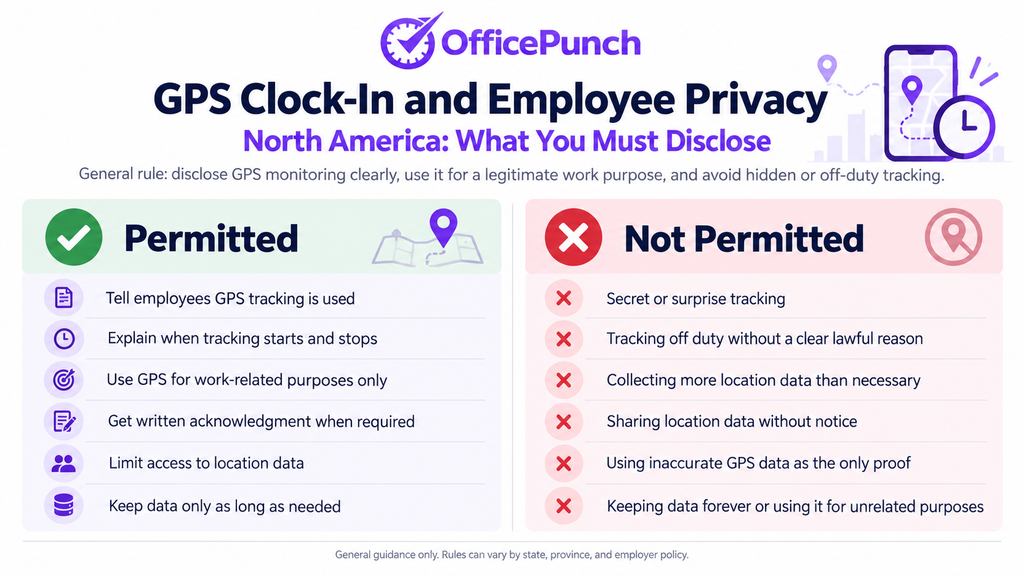
The core rule across all of these frameworks is the same: an employer may collect, use, or disclose personal employee information only with the employee’s knowledge and, where required, their consent — and only for purposes that a reasonable person would consider appropriate in the circumstances. In the monitoring context, knowledge means advance written notice of what is being tracked, why it is being tracked, and what the data will be used for.
What is covered or permitted
Desktop activity monitoring on employer-owned equipment is generally permitted provided employees are informed. The following are all permissible under Canadian law, subject to disclosure:
- App and website usage logging on employer-owned Windows computers
- Random screenshot capture during working hours
- Active versus idle time tracking
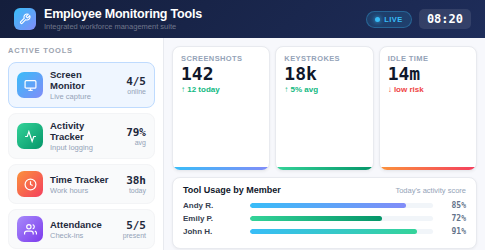
- Geofenced clock-in systems that verify location at the point of login — including OfficePunch’s geo restriction and IP restriction features
- Keystroke logging of work-related computer activity, where disclosed
What is excluded
The following are not permitted or are subject to heightened scrutiny:
- Covert monitoring without any disclosure to the employee
- Monitoring on personal devices without the employee’s express consent and a Mobile Device Management (MDM) agreement in place
- Continuous GPS tracking of employees’ personal vehicles on personal time
- Collection of personal information beyond what is necessary for the stated monitoring purpose
- Using monitoring data for purposes other than those disclosed to the employee at the time of collection
The exclusion people trip over
Personal devices are the most common monitoring overreach. If an employee uses their own phone, tablet, or laptop for work, the employer cannot install monitoring software on that device without the employee’s explicit written consent and a formal MDM framework. The fact that the device connects to company systems does not give the employer the right to monitor it. BYOD policies must be explicit about what the employer can and cannot see on a personal device.
Why it happens
Most HR software vendors design their tools for employer-owned hardware. When employees start using personal devices for work without a clear BYOD policy, the monitoring scope can inadvertently expand to personal data. The safeguard is a device policy that defines which devices the employer monitors and which it does not — and communicates that distinction clearly to employees before monitoring begins.
How to check your own case
Review your monitoring policy against each device your employees actually use for work. If a device is not employer-owned and does not have a signed MDM consent from the employee, your monitoring software should not be installed on it.
Coverage table
Disclosure requirements by jurisdiction:
| Jurisdiction | Governing Law | Employer Obligation | Key Requirement |
|---|---|---|---|
| Federal (Canada) | PIPEDA | Inform before collecting | Written policy, consent where required |
| Ontario | ESA, 2000 + PIPEDA | Written monitoring policy | Provide to all staff; 25+ employee threshold |
| British Columbia | PIPA (BC) | Consent for personal info | Written notice before collection |
| Alberta | PIPA (AB) | Reasonable purpose | Can collect without consent for reasonable workplace purposes; disclosure still required |
| Quebec | Law 25 (Bill 64) | Inform of purpose | Must disclose purpose, means, and right of access before monitoring |
| Federal regulated workplaces | Canada Labour Code + PIPEDA | Policy and consent framework | Employees must be aware of monitoring scope |
Exceptions and edge cases
Security monitoring of workplace premises
Security cameras covering common areas of a workplace do not require individual consent from each employee in most Canadian jurisdictions, but they do require disclosure — employees must be informed that surveillance cameras are in place, the purpose of the surveillance, and how long recordings are retained. The Office of the Privacy Commissioner of Canada (OPC) has issued guidance confirming that reasonable security monitoring of work premises is permissible with disclosure.
Investigation monitoring in exceptional circumstances
When an employer has reasonable grounds to suspect employee misconduct — fraud, theft, harassment, or safety violations — some jurisdictions permit targeted covert monitoring for the duration of the investigation without pre-disclosure to the subject employee. This is a narrow exception, not a general licence for covert surveillance. It must be time-limited, targeted, and proportionate to the specific matter under investigation. Legal advice is recommended before relying on this exception.
Company vehicles versus personal vehicles
Monitoring a company vehicle — using telematics or fleet management systems on an employer-owned truck, for example — is generally permissible with disclosure that the vehicle is monitored. Monitoring an employee’s personal vehicle is not permissible without their explicit consent, and even with consent, using that data for disciplinary purposes is legally precarious. OfficePunch does not include vehicle tracking of any kind; it is a Windows desktop monitoring tool.
Remote work monitoring across provincial lines
An employee working from home in British Columbia under an Ontario employer’s contract presents a jurisdictional question. Most privacy practitioners take the view that the province where the employee works governs the privacy relationship. This means an Ontario employer must comply with BC’s PIPA for a BC-based remote worker, not just Ontario’s ESA electronic monitoring requirement.
What to do next in North America
Before deploying any monitoring tool — including OfficePunch — Canadian employers should complete four steps.
First, draft a written electronic monitoring policy. The policy must state that electronic monitoring occurs, describe what is monitored (apps, websites, screenshots, attendance gates), state the purpose of the monitoring, and identify how long monitoring data is retained and who can access it.
Second, obtain the appropriate consent or provide advance notice. In Ontario, this means providing the policy to all current employees within 30 days and to new hires within 30 days of starting. In Quebec, it means informing employees of the monitoring’s purpose and means before it begins. In BC and Alberta, it means providing meaningful notice before personal information is collected.
Third, confirm that your monitoring is proportionate. The OPC’s proportionality standard asks whether a reasonable person would consider the monitoring necessary given the purpose stated, whether it is limited to what is strictly necessary, whether a less privacy-invasive alternative exists, and whether the privacy loss is justified by the operational benefit.
Fourth, establish a data retention and access policy. Employees in most Canadian jurisdictions have a right to request access to personal information held about them. Your retention policy should specify how long monitoring records are kept and confirm that employees can request access to their own data.
OfficePunch’s productivity monitoring software generates the session-level records, screenshot logs, and attendance data that a compliant monitoring programme needs to document. The platform does not replace a written policy — that remains the employer’s responsibility — but it produces the underlying data in a format that HR and legal teams can use.
For teams looking at the attendance-specific side of monitoring, the best employee attendance tracking software comparison reviews the features and disclosure considerations for the main options available to Canadian employers.
Frequently asked questions
Do I need employee consent to monitor their computer at work in Canada?
In most Canadian private-sector contexts, you need employees’ knowledge and either consent or a legitimate reasonable-purpose basis before collecting personal information through monitoring. In practice this means a written policy and advance disclosure. Consent is not always required — Alberta’s PIPA, for example, allows collection without consent for reasonable workplace purposes — but disclosure is required in all jurisdictions. Consult an employment lawyer for advice specific to your province.
Does OfficePunch use GPS to track employee locations?
No. OfficePunch is a Windows desktop monitoring tool. It does not use GPS tracking, does not track employee location on a mobile device, and does not follow employees during their shift. OfficePunch’s geo restriction feature checks whether an employee’s Windows PC is connecting from within a defined location perimeter or from an approved IP address at the point of clock-in. It is a desktop attendance gate, not a tracking system. Once the employee is clocked in, no location data is collected.
What must an Ontario employer include in their electronic monitoring policy?
Ontario’s Employment Standards Act, 2000 requires the policy to state whether the employer electronically monitors employees and, if so, what electronic monitoring occurs, the employer’s purposes for electronic monitoring, and how the employer may use information obtained through electronic monitoring. The policy must also include the date it was prepared and the date of any subsequent changes. It must be provided to employees within 30 days of implementation and to new hires within 30 days of starting.
How long can employers retain employee monitoring data in Canada?
PIPEDA and provincial equivalents do not specify a fixed retention period, but they require that personal information be retained only as long as necessary for the purpose for which it was collected. Most privacy practitioners recommend a retention period of one to three years for routine monitoring records, with longer retention only where specific records are required for an ongoing dispute, investigation, or regulatory requirement. Employers should state their retention period in their monitoring policy.
About OfficePunch
OfficePunch is a Canadian-built Windows desktop monitoring platform serving employers across North America. The platform captures attendance records automatically when a Windows PC starts, logs app and website activity throughout the shift, and takes random screenshots that give HR teams an auditable session record. OfficePunch’s geo restriction and IP restriction features verify that employees are connecting from authorised locations or networks — as a desktop clock-in gate, not as a GPS tracking system. OfficePunch is used by HR managers, operations leads, and business owners who need verifiable attendance and activity records that meet Canadian privacy law disclosure requirements.
Service area
OfficePunch serves businesses across North America, including major Canadian centres — Toronto, Vancouver, Calgary, Edmonton, Ottawa, Montreal, and Winnipeg — and US-based teams. The platform is designed for employers operating under PIPEDA, Quebec’s Law 25, BC’s and Alberta’s Personal Information Protection Acts, and Ontario’s electronic monitoring policy requirement under the Employment Standards Act, 2000. Canadian employers subject to remote employee monitoring software requirements can use OfficePunch’s records as part of their documented compliance programme.
Next step
Review the productivity monitoring software page for OfficePunch’s full feature set and to start a free plan for up to five users. For the employee time tracking software overview, including how time data flows into payroll records, the linked page covers the integration options available.