The best time and attendance software records working hours automatically, without depending on employees to remember to clock in or out. For office and remote desktop teams, that means session-level logging tied to PC startup — not a manual button or a mobile app. This guide covers what attendance software should do, how to compare tools across different team types, and how to choose the right fit for your organization. It is written for HR managers, business owners, and operations leads who need accurate attendance data and defensible records for payroll.
Key Takeaways
- The best time and attendance software captures hours automatically — at PC login for desktop teams, or via a web clock or kiosk for shared workstations.
- Desktop session logging removes the need for employee action: the record is produced by the machine, not by a manual entry.
- IP and geo-location punch restrictions (Premium) limit clock-ins to approved networks and serve as an attendance gate for office teams.
- Office Punch records session start and end times, active versus idle time, and app usage on Windows and macOS — without project management or billable hours features.
- Free plans vary widely: Office Punch’s free plan covers up to five users with automatic session logging; other tools offer free tiers with manual time tracking.
- Buddy punching — one employee clocking in for another — is prevented by session-level logging because the record comes from the PC itself, not from a user action.
What Time and Attendance Software Should Do
Time and attendance software is not a single category. The right features depend on where your employees work and what level of accuracy you need from the record.
Start Recording at PC Startup
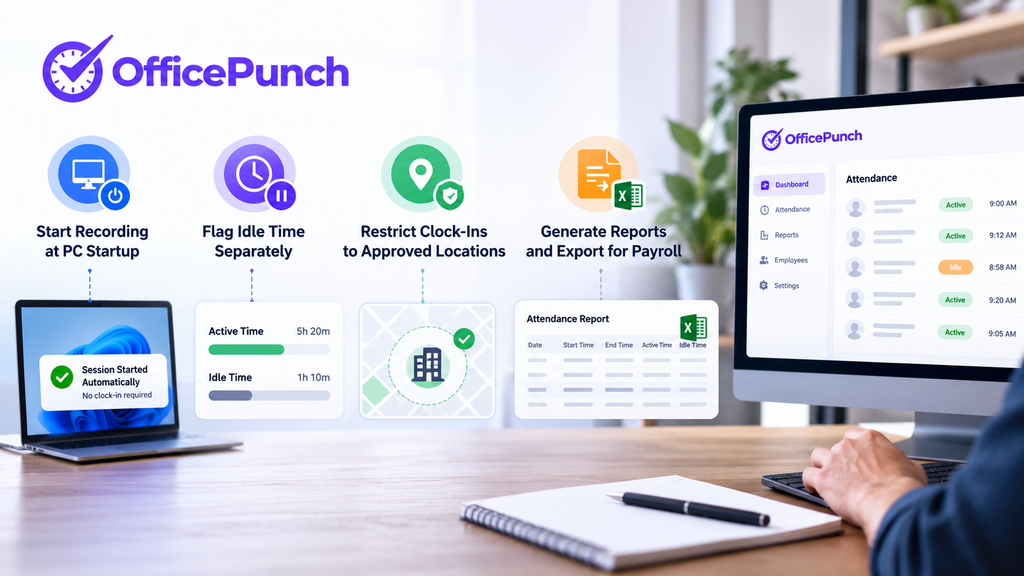
For desktop and remote teams, the most accurate attendance record starts the moment the computer boots. Office Punch records session start time automatically when an employee logs into their Windows PC or Mac. There is no clock-in button and no app to open. The record is machine-generated from the first moment of activity, which is the most important distinction between automatic and manual attendance systems.
Any system that depends on an employee action — pressing a button, tapping a phone, visiting a kiosk — will produce missed entries. End-of-day transitions, back-to-back meetings, and remote work without a structured routine all create gaps in manual records. Automating time and attendance tracking removes those gaps and reduces human data-entry mistakes at the source.
Flag Idle Time Separately
An attendance record that counts computer-on time as working time overstates hours. When a PC is left on while an employee steps away for a meeting or a break, a manual or app-based clock does not capture the difference.
Office Punch detects idle time — periods without keyboard or mouse activity — and records them separately from active working time. Managers see actual desk time rather than computer-on time. This produces a more accurate attendance record for payroll purposes and makes it easier to verify that logged hours reflect real work.
Restrict Clock-Ins to Approved Locations
Location-based punch controls vary by environment. Mobile time clock apps for field workers typically use GPS geofencing to verify physical presence at a job site. For desktop teams, network-based controls verify that a session is starting from an approved network address — the office network or a company VPN.
Office Punch’s premium plan includes IP and geo-location punch restrictions. A Windows or macOS session attempted from an unrecognized network will not begin. This functions as an attendance gate: employees can only start sessions from approved network locations.
Generate Reports and Export for Payroll
Attendance data is useful only if it can move out of the system. The right attendance software generates daily and weekly attendance reports and exports session records in a format your payroll process can use. Office Punch exports time data to Excel. Tracking time and attendance effectively ensures accurate payroll; the export step is what connects the session record to the pay calculation.
For teams that need direct payroll platform integration — ADP, QuickBooks, or similar systems — confirm that capability with the vendor before purchase. Office Punch does not offer direct payroll integrations; the export is a manual step.
Types of Time and Attendance Tracking Software
Different team types call for different software categories. Understanding what each does prevents choosing an attendance tracker built for a different environment.
Desktop Session Logging
Desktop session logging software records attendance from the PC itself. It is designed for office and remote teams where work happens on a Windows or macOS computer. Office Punch is built for this category: session start, active time, idle time, app usage, and session end are all recorded without employee input. Managers gain real-time visibility into employee attendance through a web dashboard that shows who is clocked in, who is idle, and who has not started a session.
This category is also the most effective control against buddy punching. The attendance record is the session itself — there is no clock-in action a colleague can perform on another person’s behalf.
Mobile and GPS-Based Tools
Mobile time clock apps are designed for field teams, construction, retail, and any workforce where employees are not at a fixed desktop. Mobile apps allow employees to clock in and out remotely, and many include GPS geofencing to verify presence at an approved job site.
Office Punch is not a mobile time clock app and does not include a mobile clock-in interface. Teams with field workers alongside office staff typically use a mobile tool for the field portion and a desktop session logging tool for the office.
Biometric and Kiosk Systems
Biometric time clocks — fingerprint readers, facial recognition, and badge-based systems — prevent buddy punching in high-security or shared-workstation environments. Facial recognition verifies that the person clocking in matches the employee record, making it the standard anti-fraud control in environments where multiple employees share a terminal.
Keycard and proximity card systems log entry and exit times automatically in offices and warehouses. They are fast for access control but do not capture idle time or application-level activity during the session.
Web-Based Attendance Clocks
Web-based time clocks are accessible via standard browsers and do not require a desktop app installation. They suit remote or hybrid teams accessing systems from multiple devices. These tools typically require employees to start and stop a timer, so accuracy depends on consistent, real-time use.
How to Compare Time Tracking Systems
When evaluating attendance tracking software, the comparison should focus on what the tool does automatically versus what it requires from employees.
Free vs Paid Features
Free plans vary significantly. Office Punch’s free plan covers up to five users and includes automatic session logging, idle-time auto clock-out, and 30 days of attendance history — no credit card required. Other tools offer free tiers with manual time tracking but without automatic session logging or idle detection.
The key question for any free plan is whether the core feature you need — automatic capture, idle detection, or anti-fraud controls — is included at no cost or locked behind a paid upgrade.
Buddy Punching Controls
For desktop teams, automatic session logging is the most effective control because the attendance record is generated by the PC, leaving no clock-in action for a colleague to perform. For mobile and shared kiosk environments, facial recognition and biometric verification are the standard approach. Biometric time clocks use unique physical characteristics for employee verification and are common in high-security environments.
When evaluating attendance software, confirm which buddy punching controls are included at each plan level and whether they match the environment where your employees work.
Payroll and HR Integration
Many attendance systems offer integrations with payroll tools and HR platforms. Tracking time and attendance maintains compliance with labour laws and keeps records in a form that payroll can use. Integration with HR systems streamlines attendance data management and reduces manual re-entry errors between the attendance record and the pay run.
Confirm which integrations are available on the plan you need and how data is exported if a direct connection is not available. For the distinction between time tracking and attendance tracking, and which features belong to each, see time tracking vs attendance tracking.
Office Punch for Office and Remote Desktop Teams
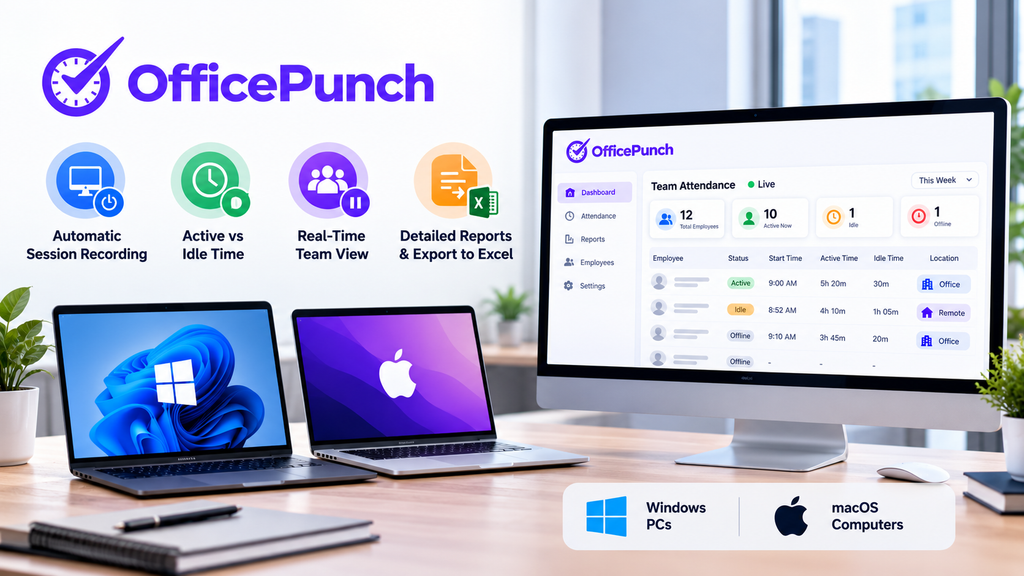
Office Punch is designed for teams working on Windows and macOS computers. The platform records session start and end automatically at PC login, tracks active versus idle time throughout the session, and gives managers a real-time dashboard with a full team attendance view.
The premium plan, at $4 per seat per month billed annually ($6 per seat per month on a monthly plan), adds app and website usage tracking, random screenshots at configurable intervals, IP and geo-location punch restrictions, and one year of data retention. The free plan covers up to five users with automatic clock-in, idle detection, and 30 days of history.
Office Punch does not include a mobile time clock, project billing, or direct payroll integrations. It provides the session-level attendance record. Teams that also need mobile clock-in, project cost tracking, or direct payroll connections will need separate tools for those functions.
For the complete feature overview, visit time and attendance software.
Frequently Asked Questions
What is the best time and attendance tracking software for office teams?
For office and remote desktop teams, the best attendance tracking software records sessions automatically at PC login without requiring any employee action. Office Punch does this for Windows and macOS teams, producing a machine-generated attendance record that managers can review in a real-time dashboard. For field or mobile teams, a GPS-enabled mobile app is the appropriate tool.
Is there a great attendance tracker with a free-forever plan?
Office Punch’s free plan covers up to five users permanently with automatic clock-in, idle detection, and 30 days of history — no credit card required. The right free attendance tracker depends on whether automatic session logging or manual clock-in meets your needs.
What is the best attendance tracking software to prevent buddy punching?
For desktop teams, Office Punch’s automatic session logging is the most effective control — the record comes from the PC itself, so there is no clock-in step a colleague can complete on someone else’s behalf. For shared kiosks and mobile environments, facial recognition is the standard. Biometric time clocks use unique physical characteristics for verification and are the typical choice in high-security or warehouse settings.
How does attendance software handle employee time and payroll?
Attendance data syncs automatically with payroll-ready records once exported from the attendance system. Office Punch exports session data to Excel; managers pull records for any employee or date range directly from the web dashboard at any time. For direct payroll platform integration, confirm that the attendance software connects to your specific payroll system before purchase. Automated records help maintain compliance with labour laws and produce a verifiable digital log.
What makes a great attendance tracking app for remote teams?
For remote desktop teams, great attendance tracking starts recording automatically at login, distinguishes active time from idle time, restricts sessions to approved network addresses, and generates exportable reports managers can check from any browser. Real-time dashboards show employee attendance status across the full team without requiring manual submissions. Office Punch covers these requirements for Windows and macOS remote teams.
Choose Attendance Software That Matches Your Team
For office and remote teams working on Windows or macOS, automatic session logging at PC startup is the most accurate and least disruptive attendance system available. Office Punch records every session without requiring employees to take any action, gives managers a real-time attendance view, and exports records for payroll.
Start with the free plan for up to five users — no credit card required — at Office Punch employee time tracking software, or explore the full paid feature set on the time and attendance software page.