Startups need accurate attendance records from the beginning. Small attendance mistakes can affect payroll, employee productivity, compliance, and workforce planning. Many startups begin with free attendance software to reduce costs, but free tools may not support long-term business needs.
Paid attendance software often provides stronger attendance tracking, better security, real time reporting, and workforce visibility. Choosing the right attendance solution depends on team size, business goals, compliance needs, and operational requirements.
Introduction
Every startup wants to manage employee attendance without increasing operational costs. At first, spreadsheets or free attendance software may seem enough. But as the workforce grows, attendance management becomes more complex.
Businesses need accurate employee attendance records, proper overtime tracking, and secure attendance data to maintain payroll accuracy and productivity. The right attendance software helps startups improve attendance visibility, reduce payroll errors, and maintain workforce accountability through structured time and attendance tracking.
Attendance Software Helps Startups Build Better Systems
Attendance software gives startups a structured way to manage employee attendance and work hours. Instead of relying on spreadsheets or manual records, businesses can automate attendance tracking and reduce administrative work.
A proper tracking system helps businesses:
- Record attendance automatically
- Track employee time
- Reduce payroll mistakes
- Monitor overtime
- Improve employee productivity
- Maintain compliance
- Improve workforce visibility
Time and attendance software also helps startups create consistent attendance records from the beginning. This becomes important as the organization grows and workforce management becomes more complex.
Free Attendance Software Works for Basic Needs
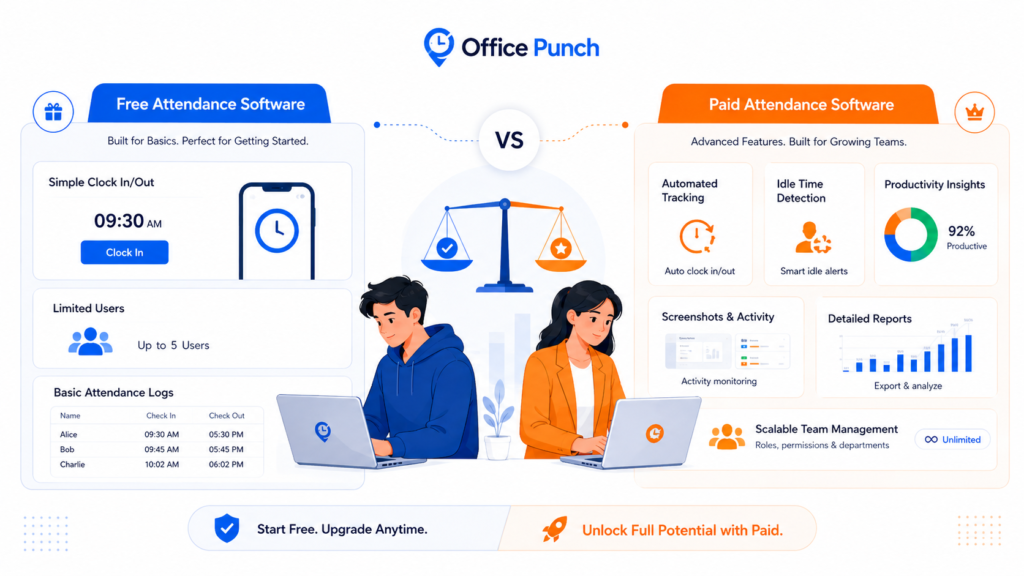
Many startups choose free attendance software during the early stages of growth. A free plan may help small teams manage basic attendance records and employee clock in activity without large upfront costs.
Free attendance software may support:
- Basic attendance tracking
- Employee attendance records
- Clock in visibility
- Limited reports
- Basic attendance time management
Some platforms also offer free forever versions with limited users and restricted features. These plans help startups understand how attendance software works before moving to advanced tools.
However, startups should understand that many free tools limit access to advanced attendance and workforce features.
Free Forever Plans Often Have Limits
A free forever plan may seem attractive for startups managing a tight budget. But many businesses discover limitations once the workforce grows.
Free attendance software may restrict:
- Real time reporting
- Attendance analytics
- Overtime tracking
- Productivity visibility
- Security controls
- Users and team size
- Advanced reports
- Time and attendance tracking features
Some free plans also require businesses to upgrade before accessing advanced attendance tracking or workforce management tools. Startups should review these limitations carefully before selecting an attendance solution.
The free plan in many systems also does not include time tracking, activity tracking, or screenshot visibility. These features are often available only on premium plans.
Attendance Tracking Improves Workforce Visibility
Attendance tracking gives managers better visibility into work hours, overtime, and employee attendance patterns. This visibility helps startups improve workforce management and maintain operational control.
Managers can review:
- Hours worked
- Attendance time
- Employee time
- Overtime trends
- Schedule patterns
- Attendance records
- Work time consistency
Accurate attendance tracking also helps startups determine workforce utilization and productivity levels across the organization.
In Office Punch, time tracking refers to attendance and activity-based work hour tracking instead of project management or billing systems.
Clock In Systems Reduce Attendance Errors
Manual attendance systems often create errors in payroll and attendance records. Employees may forget to clock in, submit incorrect time entries, or record inaccurate hours worked.
Attendance software solves this issue through automatic attendance tracking and secure clock-in systems. Office Punch automatically records attendance during PC or laptop startup. Employees start attendance tracking automatically when their desktop system turns on.
This process improves attendance consistency and reduces missing attendance records.
Businesses also gain better payroll accuracy because attendance software stores time data and attendance records automatically.
Employee Productivity Depends on Accurate Attendance Data
Startups need visibility into employee productivity and workforce attendance patterns. Attendance software helps managers understand attendance consistency and workforce activity across the team.
Attendance reports help businesses:
- Improve schedule planning
- Reduce unplanned overtime
- Review attendance patterns
- Improve workforce accountability
- Monitor employee attendance trends
- Improve operational productivity
Office Punch also supports activity visibility and proof of work through screenshots captured at random intervals. Employees cannot predict screenshot timing, which improves workforce accountability and attendance visibility.
Biometric Attendance and Security Controls Matter
Attendance security becomes more important as businesses grow. Attendance systems without proper controls may increase the risk of buddy punching and time theft.
Paid attendance software often includes stronger security features such as biometric attendance, facial recognition, geo fencing, and secure account access.
These features help startups:
- Prevent buddy punching
- Reduce time theft
- Protect attendance data
- Improve compliance
- Maintain accurate attendance records
Office Punch supports IP-based restrictions and geo-location attendance controls for desktop-based attendance tracking. Businesses can restrict attendance activity to approved IP addresses and geo boundaries for stronger attendance security.
Office Punch does not support mobile app attendance tracking or mobile location tracking.
Real Time Reporting Supports Better Decisions
Real time reporting helps managers monitor attendance records, overtime, and employee hours without delays. Startups need this visibility to improve payroll accuracy and workforce planning.
Paid attendance software often provides stronger reporting tools compared to free attendance software. Managers can review attendance records, work hours, overtime trends, and workforce data through one dashboard.
This visibility helps businesses:
- Reduce payroll mistakes
- Improve workforce planning
- Review attendance consistency
- Monitor overtime
- Maintain compliance
- Improve productivity
Real time attendance data also helps managers respond quickly when attendance issues appear.
Attendance App Searches Continue to Grow
Many startups search for an attendance app because they want simple workforce management tools. However, businesses should focus on security, attendance accuracy, and operational visibility instead of only convenience.
Office Punch focuses on desktop-based attendance tracking with secure web dashboard access for managers. This approach improves attendance control and workforce visibility while protecting attendance records.
The platform does not rely on mobile app attendance tracking or mobile-based location monitoring.
Paid Attendance Software Supports Long-Term Growth
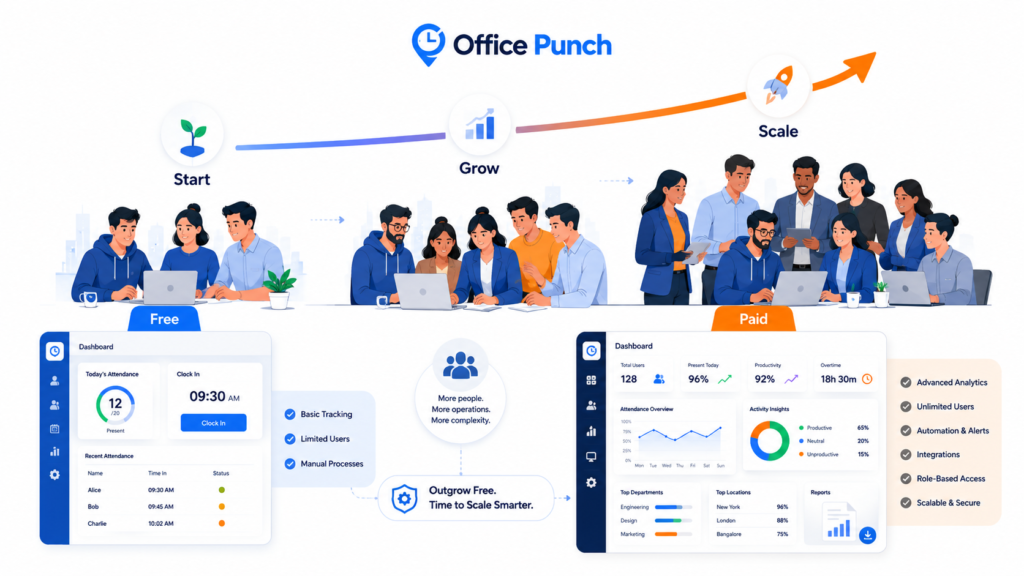
Startups often outgrow free attendance software once the workforce expands. Paid attendance software usually provides better attendance controls, advanced reporting, workforce analytics, and stronger compliance support.
Businesses that invest in structured attendance systems gain better visibility into attendance records, overtime, employee productivity, and payroll data.
Paid software also helps startups create scalable workforce processes that support long-term business growth.
Why Choose Office Punch
Office Punch helps startups improve attendance tracking, workforce visibility, and productivity management through secure desktop-based attendance software.
The platform supports:
- Automated attendance tracking
- Employee attendance management
- Real time reporting
- Attendance analytics
- Productivity visibility
- Random screenshot capture
- IP-based attendance restrictions
- Geo fencing controls
- Attendance reports
- Web dashboard access for managers
Office Punch focuses on attendance automation, workforce accountability, and attendance visibility instead of project management or billing functions.
FAQs
What is the difference between free and paid attendance software?
Free attendance software usually supports basic attendance tracking and employee attendance records. Paid attendance software often includes advanced features such as real time reporting, attendance analytics, overtime tracking, productivity visibility, security controls, and workforce reporting. Businesses should choose based on operational needs and future growth plans.
Is free attendance software enough for startups?
Free attendance software may work for small teams with simple attendance requirements. However, growing startups often need stronger attendance tracking, reporting, payroll visibility, and security controls. Businesses should review feature limitations, users, and compliance requirements before relying on a free forever plan.
How does attendance software improve employee productivity?
Attendance software improves employee productivity by helping businesses monitor attendance patterns, work hours, overtime, and workforce activity. Managers gain visibility into attendance consistency and workforce utilization, which helps improve scheduling, reduce attendance issues, and maintain accountability across the team.
How does biometric attendance prevent buddy punching?
Biometric attendance systems use facial recognition or attendance verification methods to confirm employee identity during clock in activity. These systems reduce buddy punching and time theft while improving attendance accuracy and compliance across the organization.
Does Office Punch support mobile attendance tracking?
No. Office Punch focuses on desktop-based attendance tracking and web dashboard access for managers. The platform does not support mobile app attendance tracking or mobile location tracking. Attendance security works through desktop systems, IP restrictions, and geo-location attendance controls.
Conclusion
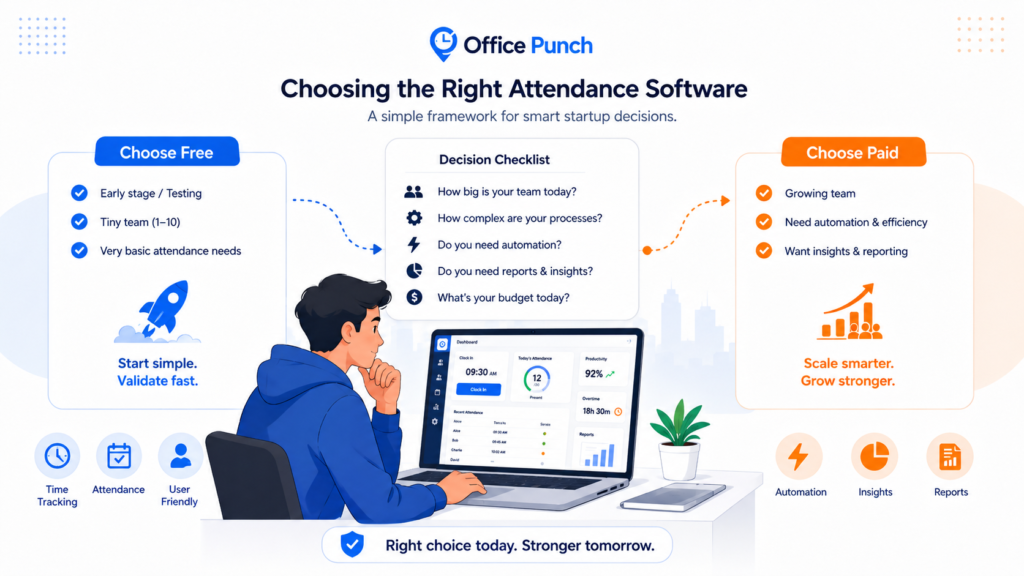
Choosing between free and paid attendance software depends on business size, workforce needs, and long-term growth plans. Free attendance software may support basic attendance management, but growing startups often need stronger attendance controls, reporting tools, and workforce visibility.
Paid attendance software helps businesses improve attendance tracking, payroll accuracy, productivity visibility, and workforce accountability. Startups that implement structured attendance systems early can create stronger workforce processes and improve operational efficiency over time.
Budget friendly time & attendance tracker
Startups looking to improve employee attendance, payroll accuracy, and workforce visibility should evaluate attendance software that supports long-term business growth. A structured attendance solution can help organizations maintain accurate attendance records, strengthen accountability, and improve productivity across the workforce.
Help your company track time more effectively with Office Punch.