Attendance monitoring software records when employees start work, when they are present, and when they are absent — without requiring employees to manually clock in each day. For office and remote teams where work happens on a desktop computer, the most accurate version of this is automatic: the record starts at PC login and stops when the session ends. This guide covers what attendance monitoring software does, who Office Punch fits, what managers can check in real time, and how attendance records connect to payroll. It is written for HR managers, operations leads, and business owners managing office or remote teams in North America.
Key Takeaways
- Attendance monitoring software records who is in, who is late, and who is absent — in real time, without depending on employees to submit a manual entry.
- Office Punch starts recording automatically when an employee logs into their Windows or macOS computer — no clock-in button, no app to open.
- IP and geo-location punch restrictions (Premium) limit sessions to approved networks, functioning as an attendance gate for office teams.
- Office Punch is built for office and remote desktop teams; it is not a field attendance tool and does not include a mobile clock-in app.
- The free plan covers up to five users with automatic session logging and 30 days of attendance history. No credit card required.
- Attendance records from Office Punch export to Excel for payroll review; the platform does not offer direct payroll integrations.
What Attendance Monitoring Software Does
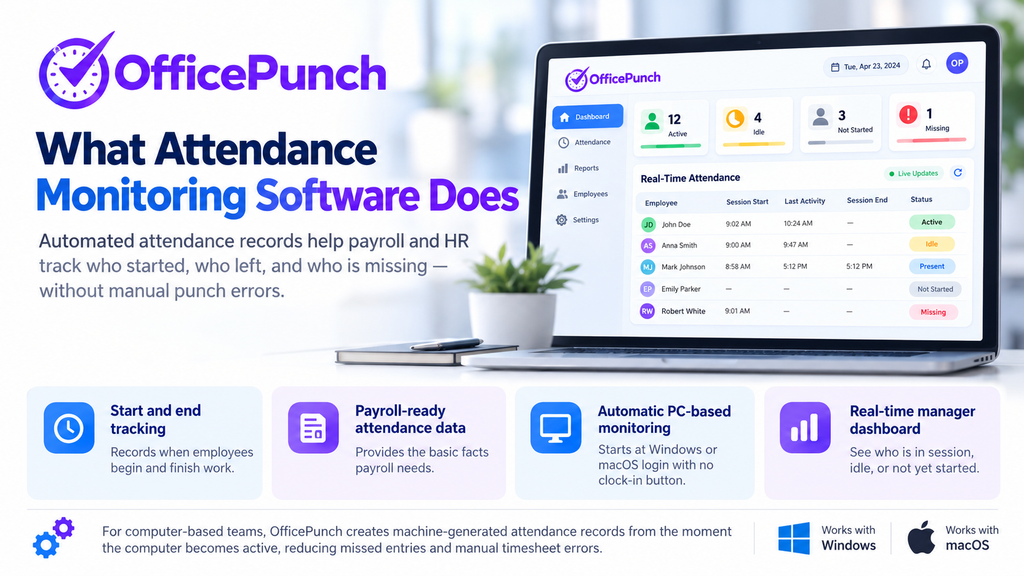
Attendance monitoring software records the basic facts of employee presence: who is at work, when they started, when they left, and whether any session is missing. These are the inputs payroll needs to process hours correctly, and the records HR needs to identify patterns — repeated late arrivals, unexplained absences, or early departures.
The standard approach in manual systems is a paper timesheet or PIN-based punch clock. The record is only as complete as the employees’ memory and discipline. Automated data collection removes those manual steps and the errors that come with them.
For computer-based teams, the most accurate attendance monitoring starts at the PC itself. Office Punch records session start and end automatically when an employee logs into a Windows or macOS computer. There is no clock-in button to press. The record is machine-generated from the moment the computer is active, so missed entries from an end-of-day rush do not occur.
Real-time dashboards show employee attendance status throughout the day. Managers can see, at any moment, who is currently in a session, who is idle, and who has not started work. Real-time reporting allows instant monitoring without waiting for employees to submit anything.
Who Office Punch Is Best For
Not all attendance monitoring software is built for the same environment. Office Punch is designed for one specific context: teams where work happens on a desktop or laptop computer running Windows or macOS.
Office Teams on Windows and macOS
For office teams where every employee has their own computer, Office Punch produces a complete attendance record automatically. Session start time, active working time, idle periods, and session end are all recorded from the PC itself. Managers see a daily attendance timeline for each employee in the web dashboard, with no submission required from the team.
The premium plan includes IP and geo-location punch restrictions that limit sessions to approved network addresses — the office network or a company VPN. A session attempted from an unrecognized network will not begin. The check happens at login only.
Remote and Hybrid Desktop Teams
For remote teams, the attendance record problem is especially difficult with manual systems. There is no physical arrival to anchor the clock-in habit, and end-of-day routines vary widely from person to person. Office Punch resolves this by recording the session from the moment the computer is active — the remote employee’s login is the attendance record.
Hybrid teams with some employees in the office and some at home work from a single Office Punch account. Both sets of employees appear in the same manager dashboard, with the same session-level attendance data, regardless of where they are working from.
Who Office Punch Is Not Designed For
Office Punch is not a field attendance tool. It does not include a mobile clock-in app for employees who are not working at a desktop PC. Field teams — construction, delivery, retail, and similar workforces — require a mobile time clock app with location verification.
For teams with a mix of desktop and field employees, Office Punch covers the desktop portion of the workforce. A separate mobile attendance tool would be needed for field staff.
Attendance Records Managers Can Check Daily
The value of attendance monitoring software is the visibility it gives managers — not just at the end of the week when payroll runs, but throughout the working day when corrections are still easy to make.
Real-Time Dashboard
Office Punch’s web dashboard gives managers a live view of the full team’s attendance status. Each employee shows as currently active, idle, or not yet started. Managers do not need to send a message or wait for a report — the current attendance state is visible at any time from any browser.
Real-time tracking provides visibility into who is present, late, or absent. For managers of remote teams, this replaces the guesswork of not knowing whether a team member is working or unreachable.
Late Arrival and Absence Alerts
Office Punch sends attendance exception emails when sessions deviate from expected patterns — late arrivals, early departures, and sessions that did not start during expected working hours. Managers can receive notifications about incomplete session records without reviewing the full dashboard manually.
Real-time alerts notify managers of missed clock-ins, giving them the chance to follow up the same day while the correct information is easy for the employee to recall. A gap caught within 24 hours is a minor administrative fix. A gap discovered at the end of the pay period is a correction that takes longer to resolve and is harder to verify.
Idle Time Detection
Office Punch distinguishes active session time from idle time. When a PC goes inactive — no keyboard or mouse input beyond the configured threshold — Office Punch flags the period as idle in the session record. Managers see actual working time rather than computer-on time, which produces a more accurate attendance record for payroll purposes.
Premium plans allow managers to set custom idle thresholds. A shorter threshold — 5 to 7 minutes of inactivity — suits high-activity work where pauses are the exception. A longer threshold — 20 minutes or more — suits roles where thinking, reading, or calls are part of the work. Custom thresholds reduce noise in the attendance data.
App and Website Usage Tracking
On the premium plan, Office Punch records which applications and websites were active during each session. This is an activity record, not a billing record — it does not assign time to specific clients or projects. It gives managers a factual view of how desktop time was spent, which adds context to the session-level attendance data.
Attendance Monitoring and Payroll Processing
Attendance data is useful for payroll only if it can be verified and exported. Office Punch provides both.
Accurate Records for Payroll
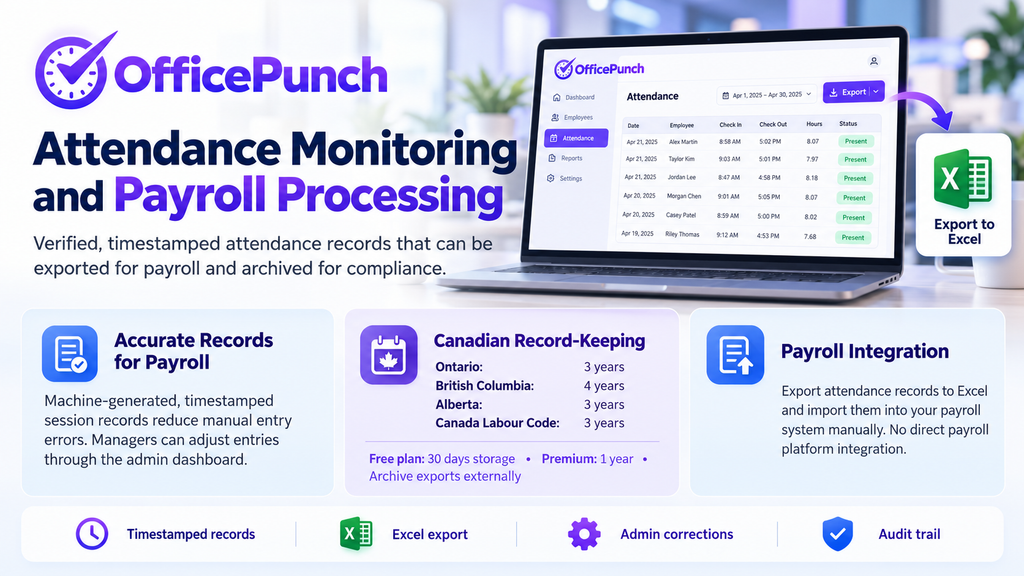
Payroll processing depends on accurate time records. Automated time tracking reduces payroll errors significantly by removing the manual data-entry step that produces most mistakes. Office Punch’s session records are machine-generated and timestamped — they are not self-reported estimates. Managers adjust individual entries through the web dashboard when corrections are needed; employees cannot edit their own records.
At the end of each pay period, the admin exports session records to Excel. The exported file becomes the payroll input for that period, reviewed against whatever payroll system the organization uses. Accurate payroll processing eliminates human error in data entry regarding hours worked.
Canadian Record-Keeping Requirements
Canadian employment standards legislation requires employers to maintain time records for three to four years, depending on province. Ontario requires three years under the Employment Standards Act, 2000; British Columbia requires four years under its Employment Standards Act (s.28(2)(c)); Alberta requires three years under the Employment Standards Code (s.15); federally regulated employers under the Canada Labour Code require three years. Retain records for the longest applicable period when employees work across multiple provinces.
Office Punch stores session records for 30 days on the free plan and one year on the premium plan. Employers must archive exported records outside of Office Punch to meet provincial retention minimums. The exported records are timestamped and machine-generated, which supports a defensible audit trail.
Payroll Integration
Office Punch does not offer direct integration with payroll platforms. The admin downloads the session record from the web dashboard and imports the data into the payroll system manually. Teams that need automated payroll sync should confirm integration availability before selecting any attendance software.
For more on how attendance records connect to payroll under Canadian employment law, see Office Punch attendance software.
Buddy Punching and Desktop Attendance Controls
Buddy punching — one employee clocking in for another who is not present — is a common problem with PIN-based time clocks and mobile apps. For desktop teams, Office Punch’s automatic session logging removes the mechanism through which buddy punching occurs.
Because the attendance record is generated by the PC itself, there is no clock-in action a colleague can complete on someone else’s behalf. The session exists only when the employee’s computer is active — there is nothing to fake and no user step to intercept.
For teams where biometric controls or GPS verification are needed, those features belong in mobile and kiosk-based attendance platforms. For a full breakdown of what buddy punching costs and how to stop it across different environments, see buddy punching: what it costs and how to stop it.
Free Attendance Software vs Paid
Attendance monitoring software is available across a wide range of price points. What varies is which core features are available at no cost and which require a paid plan.
Office Punch’s free plan covers up to five users with automatic session logging, idle-time auto clock-out, and 30 days of attendance history — no credit card required. The premium plan is $4 per seat per month billed annually and adds app and website usage tracking, random screenshots, IP and geo-location punch restrictions, and one year of data retention.
The comparison point for free plans is whether the specific feature your team needs — automatic session logging, idle detection, or punch restrictions — is included at no cost. For small office or remote desktop teams, Office Punch’s free plan provides the full automatic attendance layer for up to five users without a trial period or payment.
For guidance on choosing between attendance monitoring options based on your team’s setup, see best time and attendance software.
Frequently Asked Questions
What is attendance monitoring software?
Attendance monitoring software records when employees start and end work, identifies late arrivals and absences, and stores those records for payroll and compliance purposes. For desktop teams, the most accurate version records sessions automatically at PC login without requiring employees to take any action. Office Punch does this for Windows and macOS computers.
What is the best attendance tracking software for remote teams?
For remote desktop teams, the best attendance tracking software starts recording at PC login, distinguishes active from idle time, restricts sessions to approved networks, and gives managers a real-time dashboard without manual submissions. Office Punch covers these requirements for Windows and macOS. For field or mobile teams, a GPS-enabled mobile app is the appropriate tool.
How does attendance software handle real-time reporting?
Office Punch’s web dashboard shows a live view of who is active, who is idle, and who has not started a session. Attendance exception emails alert managers to late arrivals and missing sessions the same day they occur, allowing follow-up before the pay period closes.
Is there free time and attendance tracking software with no credit card required?
Office Punch’s free plan covers up to five users with automatic clock-in, idle detection, and 30 days of attendance history — no credit card required. The right choice depends on whether automatic session logging is needed.
How does attendance monitoring software prevent buddy punching?
For desktop teams, Office Punch’s automatic session logging prevents buddy punching because the attendance record is produced by the PC itself — there is no clock-in action for a colleague to complete on someone else’s behalf. For kiosk and mobile environments, facial recognition and biometric verification are the standard controls. See buddy punching: what it costs and how to stop it for a full breakdown of controls by environment.
What does time and attendance software include for employee time records?
Office Punch records session start time, active working time, idle time, and session end for each employee, each day. Managers can export this data to Excel for any employee or date range. The records are machine-generated, timestamped, and stored in Office Punch’s system. Office Punch does not include direct payroll platform integrations or project management features.
Start Monitoring Attendance Automatically With Office Punch
For office and remote desktop teams on Windows or macOS, Office Punch provides automatic attendance monitoring from the first login: session records without manual input, idle detection, a real-time manager dashboard, and exportable data for payroll.
Start with the free plan for up to five users — no credit card required — at Office Punch employee time tracking software.