Employee attendance compliance means having an accurate, verifiable record of when each employee worked — and being able to produce that record when payroll, an employment standards officer, or a court asks for it. For Canadian employers, the record-keeping requirement is a legal obligation, not a best practice. This post covers what attendance compliance requires, how attendance tracking software supports it, and what to look for when choosing a system for an office or remote team. It is written for HR managers and business owners in Canada and the United States who need attendance records that hold up.
Key Takeaways
- Attendance compliance requires accurate daily records of hours worked, stored for three to four years depending on the province.
- Automated attendance tracking removes the manual entry errors that produce most payroll and compliance problems.
- Office Punch records sessions automatically at PC login for Windows and macOS teams — no manual clock-in, no estimated hours.
- IP and geo-location punch restrictions (Premium) limit sessions to approved networks, functioning as a session access control.
- Office Punch does not offer mobile clock-in, QR codes, or biometric verification.
- The free plan covers up to five users; the premium plan adds screenshots, app usage tracking, and one year of data retention.
What Employee Attendance Compliance Requires
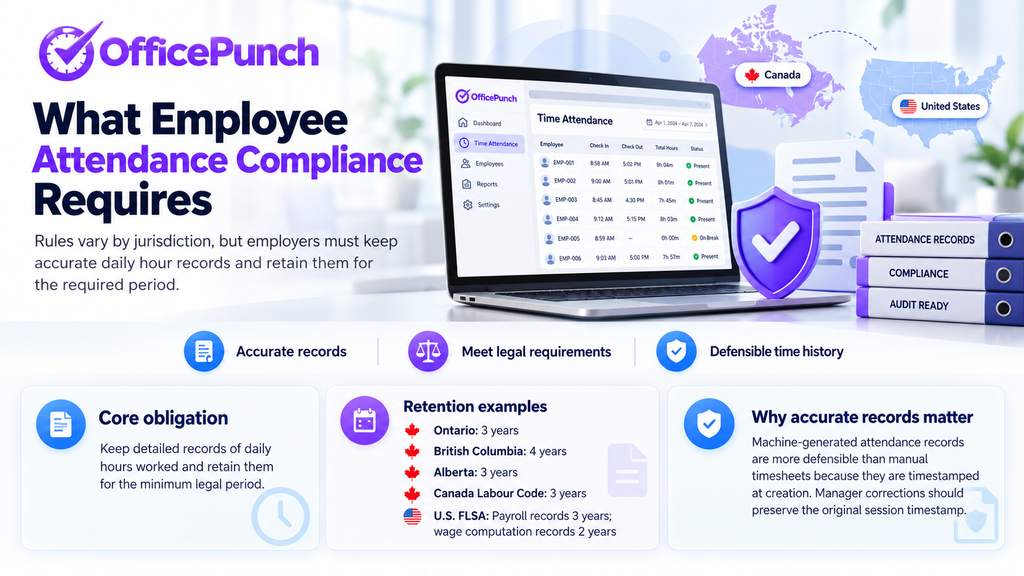
Attendance compliance is not a single standard — it varies by province, territory, and federal jurisdiction in Canada, and by state in the United States. What is consistent is the core obligation: employers must keep detailed records of daily hours worked and retain those records for a minimum period.
In Canada, Ontario’s Employment Standards Act, 2000 requires employers to retain time records for three years. British Columbia’s Employment Standards Act (s.28(2)(c)) requires four years. Alberta’s Employment Standards Code (s.15) requires three years. Employers regulated under the Canada Labour Code must keep records for three years. In the United States, the Fair Labor Standards Act requires employers to keep payroll records for three years and wage computation records for two years.
For jurisdiction-specific overtime rules and what time records must prove, see overtime rules by jurisdiction.
Accurate attendance records also matter when overtime is in dispute. The employer bears the burden of proof in most employment standards proceedings in Canada. A machine-generated attendance record is more defensible than a manually submitted timesheet because it is timestamped at creation. When corrections are needed, managers adjust entries through the admin dashboard and the original session timestamp is preserved.
How Attendance Tracking Software Supports Compliance
Attendance tracking software reduces compliance risk by producing records that are accurate, complete, and exportable for audits or payroll.
Automatic Session Records
The most common source of attendance compliance problems is inaccurate data. Digital systems eliminate human error by capturing clock-in and clock-out times automatically, without depending on employees to remember to log their hours.
Office Punch records session start and end automatically when an employee logs into their Windows or macOS computer. There is no clock-in button. The record is produced by the machine at the moment the session begins, removing the end-of-day reconstruction errors that affect manual timesheets. Attendance data syncs to the cloud in real time.
Overtime Tracking
Automated attendance tools flag hours that exceed daily or weekly thresholds. When session records show total hours approaching overtime limits, managers can review and act before payroll runs — rather than discovering an overtime liability after the fact.
Office Punch records total active session time per day and per week for each employee. Managers export this data at the end of the pay period and verify whether hours are within expected ranges. Office Punch does not apply province-specific or state-specific overtime rules automatically; the exported records provide the factual hours that a payroll or HR system uses to apply those rules.
Stored Records for Audits
Attendance tracking must produce records that can be retrieved and presented in an audit or dispute. Office Punch stores session records for 30 days on the free plan and one year on the premium plan. Records are exportable to Excel from the web dashboard for any employee and any date range.
Employers with retention obligations beyond one year should archive exported records outside of Office Punch. Digital systems simplify record-keeping for compliance with labour laws when the export and archiving process is part of the routine.
Punch Restrictions
Accurate attendance tracking requires that sessions start from approved locations. Office Punch’s premium plan includes IP and geo-location punch restrictions that limit session starts to approved networks — the office network or a company VPN. A session attempted from an unrecognized network will not begin.
The check happens at login only. For organizations where employees must be at an approved location to start a session, these controls provide that gate without changing how employees log in.
Who Office Punch Is Designed For
Office Punch is built for office and remote teams where employees work on Windows or macOS computers. Attendance is recorded from the PC itself — the session log is the attendance record.
Office Punch is not designed for field-based workforces. It does not include a mobile clock-in app, GPS tracking, QR code check-in, or biometric verification. Organizations with employees away from a desktop — construction, delivery, retail, or other field roles — need a mobile attendance tool for those employees.
For distributed teams and knowledge workers at a computer, automatic session logging captures attendance without requiring any change to how employees work.
Free Attendance Software vs Paid
Attendance compliance does not require expensive software. Several options offer a free or low-cost entry point with the core features small organizations need.
Office Punch’s free plan covers up to five users with automatic session logging, idle-time auto clock-out, and 30 days of attendance history. No credit card is required. The premium plan is $4 per seat per month billed annually and adds app and website usage tracking, random screenshots, IP-based geo-fencing, and one year of data retention.
The key distinction for compliance purposes is whether the software produces a machine-generated record or relies on employee self-reporting. Self-reported timesheets are estimates; machine-generated session records are timestamped facts.
Choosing an Attendance Compliance System
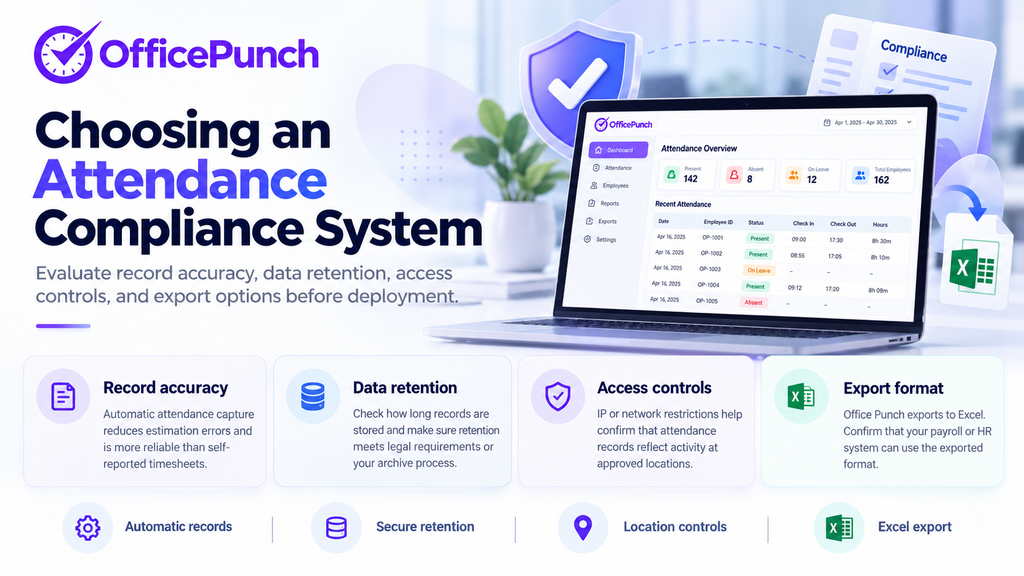
When choosing attendance tracking software for compliance purposes, the evaluation should cover four areas.
Record accuracy: Does the software record attendance automatically, or does it require an employee action? Automatic recording eliminates the estimation errors that make self-reported timesheets unreliable.
Data retention: How long does the software store attendance records, and how are they exported? Confirm that the retention period meets your jurisdiction’s requirements, or build an archiving process for longer retention.
Access controls: Does the software restrict where sessions can start? IP restriction or network-based controls help ensure that attendance records reflect actual presence at an approved location.
Export format: Can records be exported in a format your payroll or HR process can use? Office Punch exports to Excel. Confirm compatibility with your payroll system before deploying.
Frequently Asked Questions
What is attendance tracking software?
Attendance tracking software records when employees clock in and out, stores those records for payroll and compliance purposes, and gives managers visibility into who is present, late, or absent. The most accurate systems record attendance automatically — from a PC session, a web clock, or a mobile app — rather than requiring employees to submit manual time entries.
What attendance data does Office Punch record?
Office Punch records session start time, active time, idle time, and session end for each employee, each day. On the premium plan, it also records app and website usage and captures random screenshots. Records are exportable from the web dashboard for any employee and any date range. Office Punch does not record GPS location, QR code check-ins, or biometric data.
How does accurate attendance tracking support compliance?
Accurate attendance records support compliance by providing a timestamped, machine-generated record that employers can produce in an employment standards audit or dispute. Canadian employers bear the burden of proof in overtime and unpaid-hours claims, so record quality directly affects the employer’s ability to defend a claim. Automated systems produce more defensible records than manually submitted timesheets.
Is there free attendance software without hidden fees?
Office Punch’s free plan covers up to five users permanently with automatic session logging and 30 days of history — no credit card required. Advanced features such as extended data retention, screenshots, and geo-location punch restrictions are available on the premium plan.
How does attendance tracking software prevent buddy punching?
For desktop teams, Office Punch’s automatic session logging removes the mechanism through which buddy punching occurs: because the attendance record is generated by the PC itself, there is no clock-in step a colleague can complete on someone else’s behalf. For kiosk and mobile environments, biometric verification — facial recognition, fingerprint scanning — is the standard control. Office Punch does not include biometric features; it covers the desktop attendance layer only.
What add-ons are available on Office Punch’s premium plan?
Office Punch’s premium plan ($4 per seat per month, billed annually) adds app and website usage tracking, random screenshots at configurable intervals, IP-based geo-fencing, shift management features, and one year of data retention. Advanced reporting and attendance exception alerts are also available on the premium plan. Contact Office Punch support to confirm the current feature set before deployment.
Start Tracking Attendance With Office Punch
For office and remote desktop teams, Office Punch provides automatic attendance records from the first login — no manual input required, no estimated hours, and a full session record that is exportable for payroll and compliance purposes.
Start with the free plan for up to five users at Office Punch employee time tracking software. No credit card required.